주요 콘텐츠로 건너뛰기

HP Media Center 876x Front Cover Replacement

필요한 것

  1. HP Media Center 876x Front Cover Replacement, Side Panel: 1 단계, 이미지 2개 중 1개 HP Media Center 876x Front Cover Replacement, Side Panel: 1 단계, 이미지 2개 중 2개
    • Remove the two (9 mm) hand screws on the back panel.

  2. HP Media Center 876x Front Cover Replacement: 2 단계, 이미지 3개 중 1개 HP Media Center 876x Front Cover Replacement: 2 단계, 이미지 3개 중 2개 HP Media Center 876x Front Cover Replacement: 2 단계, 이미지 3개 중 3개
    • Place the tower on its side.

    • Slide the side panel horizontally to detach, and pull upward to remove.

  3. HP Media Center 876x Front Cover Replacement, Front Cover: 3 단계, 이미지 2개 중 1개 HP Media Center 876x Front Cover Replacement, Front Cover: 3 단계, 이미지 2개 중 2개
    • Orient the tower vertically.

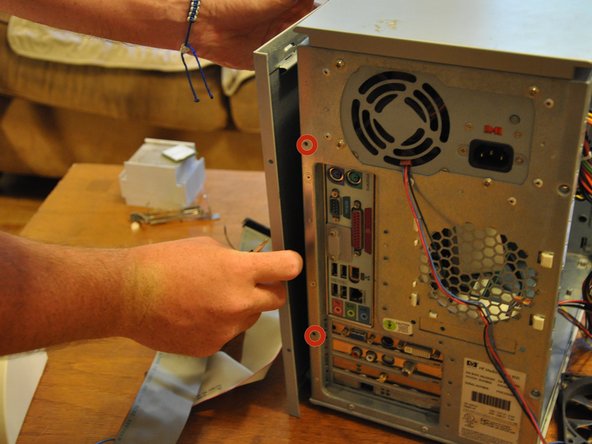
    • Using the #0 Phillips head screwdriver, unscrew and remove the two (5 mm) screws that fasten the remaining side panel to the tower.

    • Slide the side panel out of its notches, and pull it gently off of the tower.

  4. HP Media Center 876x Front Cover Replacement: 4 단계, 이미지 1개 중 1개
    • Gently move the tower so that it is in the horizontal orientation.

    • Press down the black tabs (proximal to you) that fasten the front panel to the tower.

    • Press down on the distal, black tabs (symmetric with respect to the previous tabs).

    • Pull front panel forward slightly.

  5. HP Media Center 876x Front Cover Replacement: 5 단계, 이미지 2개 중 1개 HP Media Center 876x Front Cover Replacement: 5 단계, 이미지 2개 중 2개
    • Orient the tower vertically.

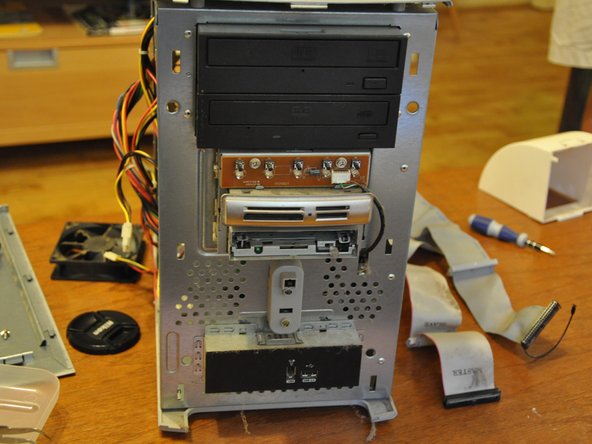
    • The front panel will come off in a hinge-like fashion, exposing the drives underneath.

결론

To reassemble your device, follow these instructions in reverse order.

작성자

4다른 기여자 명과 함께

Balakrishnan Pillai

회원 가입일: 03/26/14

1,003 평판

안내서 8개를 작성함

Clemson, Team 6-1, Benson Spring 2014 Clemson, Team 6-1, Benson Spring 2014 회원

CLEM-BENSON-S14S6G1

3 회원들

안내서 15개를 작성함

0가이드 댓글

댓글 쓰기

조회 통계:

지난 24시간: 0

지난 7일: 4

지난 30일: 15

전체 시간: 621