주요 콘텐츠로 건너뛰기

HP Mini 210-1199DX Wireless Card Replacement

필요한 것

  1. HP Mini 210-1199DX Wireless Card Replacement, Battery: 1 단계, 이미지 2개 중 1개 HP Mini 210-1199DX Wireless Card Replacement, Battery: 1 단계, 이미지 2개 중 2개
    • Unplug the netbook.

    • Secure the netbook in a upright position.

    • Slide the plastic battery latch that secures it into the netbook.

    • Keep thumb secure on the right tab as you begin to remove the battery.

  2. HP Mini 210-1199DX Wireless Card Replacement: 2 단계, 이미지 1개 중 1개
    • Remove the battery from the device.

  3. HP Mini 210-1199DX Wireless Card Replacement, Bottom Cover: 3 단계, 이미지 1개 중 1개
    • Press down on the two orange buttons to release.

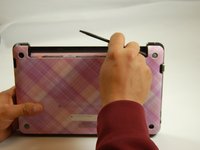
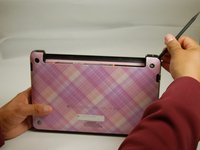
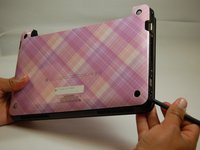
    • If the case does not pop off, begin to use Spudger to pry the case off the back.

  4. HP Mini 210-1199DX Wireless Card Replacement: 4 단계, 이미지 3개 중 1개 HP Mini 210-1199DX Wireless Card Replacement: 4 단계, 이미지 3개 중 2개 HP Mini 210-1199DX Wireless Card Replacement: 4 단계, 이미지 3개 중 3개
    • Place the spudger on corners and openings in order to begin removal of the back.

    • Continue this on all corner until the case comes fully off of the back.

  5. HP Mini 210-1199DX Wireless Card Replacement: 5 단계, 이미지 1개 중 1개
    • Pull the case off of the device

  6. HP Mini 210-1199DX Wireless Card Replacement, Wireless Card: 6 단계, 이미지 1개 중 1개
    • Locate the Wireless Card.

  7. HP Mini 210-1199DX Wireless Card Replacement: 7 단계, 이미지 1개 중 1개
    이 단계에 사용된 도구:
    Tweezers
    $4.99
    • With fingers or tweezers, carefully pull the black and white wire connectors from their sockets and move them to the side.

  8. HP Mini 210-1199DX Wireless Card Replacement: 8 단계, 이미지 2개 중 1개 HP Mini 210-1199DX Wireless Card Replacement: 8 단계, 이미지 2개 중 2개
    • With a Phillip's Screwdriver, firmly but slowly remove the two screws from the top of the wireless card.

    • Be careful not to strip the nail head.

  9. HP Mini 210-1199DX Wireless Card Replacement: 9 단계, 이미지 1개 중 1개
    • Pull the wireless card out.

결론

To reassemble your device, follow these instructions in reverse order.

작성자

4다른 기여자 명과 함께

Phillip Winston

회원 가입일: 03/21/17

655 평판

안내서 6개를 작성함

Texas Tech, Team S46-G3, Bennett Spring 2017 Texas Tech, Team S46-G3, Bennett Spring 2017 회원

TTU-BENNETT-S17S46G3

3 회원들

안내서 6개를 작성함

0가이드 댓글

댓글 쓰기

조회 통계:

지난 24시간: 2

지난 7일: 3

지난 30일: 6

전체 시간: 580