주요 콘텐츠로 건너뛰기

HP Pavilion dv4-4141us RAM Replacement

필요한 것

  1. HP Pavilion dv4-4141us RAM Replacement, RAM: 1 단계, 이미지 1개 중 1개
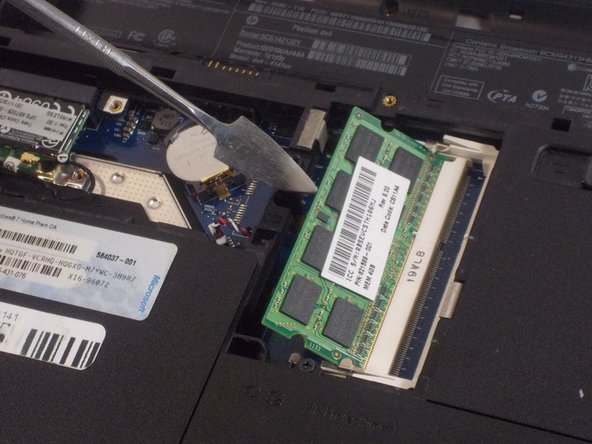
    • Lift up the back panel using a spudger and remove it from the device.

  2. HP Pavilion dv4-4141us RAM Replacement: 2 단계, 이미지 1개 중 1개
    • Push the two metal clips away from each other to release the RAM.

  3. HP Pavilion dv4-4141us RAM Replacement: 3 단계, 이미지 2개 중 1개 HP Pavilion dv4-4141us RAM Replacement: 3 단계, 이미지 2개 중 2개
    • Each RAM stick will pop up at a 45 degree angle.

    • Pull the RAM up and away and remove it from the device.

    • Do not use a metal spudger for this step. Incorrect use of the metal spudger can damage the internal components in your device.

결론

To reassemble your device, follow these instructions in reverse order.

작성자

2다른 기여자 명과 함께

Vincent Gardner

회원 가입일: 10/25/21

390 평판

안내서 3개를 작성함

UMass Dartmouth, Team 2-3, Sinclaire Fall 2021 UMass Dartmouth, Team 2-3, Sinclaire Fall 2021 회원

UMASSD-SINCLAIRE-F21S2G3

3 회원들

안내서 7개를 작성함

0가이드 댓글

댓글 쓰기

조회 통계:

지난 24시간: 1

지난 7일: 1

지난 30일: 4

전체 시간: 159