주요 콘텐츠로 건너뛰기

HP Pavilion x360 11-p110nr Key Replacement

필요한 것

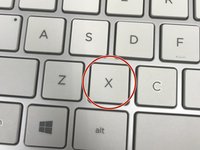
  1. HP Pavilion x360 11-p110nr Key Replacement, Key: 1 단계, 이미지 1개 중 1개
    • Use a screwdriver or other flat instrument to get under the key, and pull up slightly on one of the edges.

  2. HP Pavilion x360 11-p110nr Key Replacement: 2 단계, 이미지 3개 중 1개 HP Pavilion x360 11-p110nr Key Replacement: 2 단계, 이미지 3개 중 2개 HP Pavilion x360 11-p110nr Key Replacement: 2 단계, 이미지 3개 중 3개
    이 단계에 사용된 도구:
    Tweezers
    $4.99
    • Clear out any obstructions or crumbs that are jamming the key or the hinges underneath.

    • You may use a Q-tip, toothpick, or tweezers.

  3. HP Pavilion x360 11-p110nr Key Replacement: 3 단계, 이미지 2개 중 1개 HP Pavilion x360 11-p110nr Key Replacement: 3 단계, 이미지 2개 중 2개
    • Use the flat screw to put the key back into place.

    • Gently press the key down. It should snap back into place

결승점

작성자

2다른 기여자 명과 함께

AljeannaJohnson

회원 가입일: 09/20/17

202 평판

안내서 2개를 작성함

0가이드 댓글

댓글 쓰기

조회 통계:

지난 24시간: 0

지난 7일: 0

지난 30일: 5

전체 시간: 3,455