주요 콘텐츠로 건너뛰기

HP Photosmart D110a Printer Hood Assembly Replacement

필요한 것

  1. HP Photosmart D110a Printer Hood Assembly Replacement, Printer Hood Assembly: 1 단계, 이미지 1개 중 1개
    • Pull down both front panels to open the printer. Lift the scanner flap upward by pulling down on it; there are two mouth pieces that need to be pulled down.

    • Adjust the flap covering the scanner upward, as shown.

  2. HP Photosmart D110a Printer Hood Assembly Replacement: 2 단계, 이미지 1개 중 1개
    • Pull the scanner flap gently away from the printer to release its two clips.

  3. HP Photosmart D110a Printer Hood Assembly Replacement: 3 단계, 이미지 1개 중 1개
    • Locate the three screws on top of the printer.

    • The orange circle shows a fourth screw located behind the power panel. Ignore this one for now, as directions to remove this screw are in Step 5.

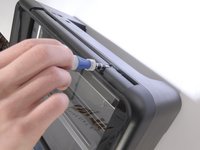
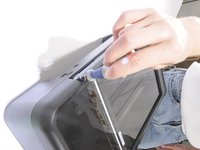
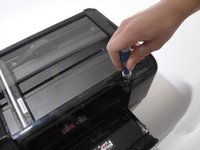
  4. HP Photosmart D110a Printer Hood Assembly Replacement: 4 단계, 이미지 3개 중 1개 HP Photosmart D110a Printer Hood Assembly Replacement: 4 단계, 이미지 3개 중 2개 HP Photosmart D110a Printer Hood Assembly Replacement: 4 단계, 이미지 3개 중 3개
    • Using a T-9 screwdriver, remove the three screws from the printer's top.

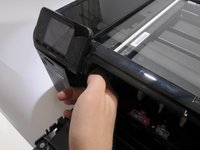
  5. HP Photosmart D110a Printer Hood Assembly Replacement: 5 단계, 이미지 2개 중 1개 HP Photosmart D110a Printer Hood Assembly Replacement: 5 단계, 이미지 2개 중 2개
    • To remove the power button panel:

    • Reach inside the printer's front opening.

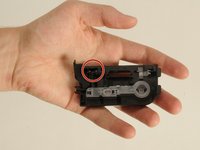
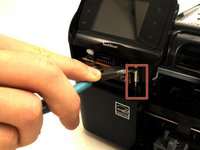
    • Press the small clip behind the power button.

    • A picture of the power button panel removed is provided to show the location of the clip that needs to be pressed.

    • Pull the panel out from right to left.

  6. HP Photosmart D110a Printer Hood Assembly Replacement: 6 단계, 이미지 2개 중 1개 HP Photosmart D110a Printer Hood Assembly Replacement: 6 단계, 이미지 2개 중 2개
    • Remove the fourth screw, which was covered by the power button panel.

    • Do not try and torque the screw from an angle. This will ruin the screw's head, and make it even more difficult to remove the screw. Only remove it as already described.

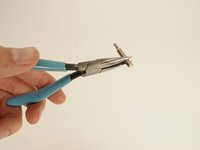
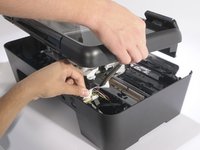
    • This screw is placed awkwardly. We found holding a T9 bit in a pair of needle nose pliers gave us enough leverage to pull it up.

  7. HP Photosmart D110a Printer Hood Assembly Replacement: 7 단계, 이미지 3개 중 1개 HP Photosmart D110a Printer Hood Assembly Replacement: 7 단계, 이미지 3개 중 2개 HP Photosmart D110a Printer Hood Assembly Replacement: 7 단계, 이미지 3개 중 3개
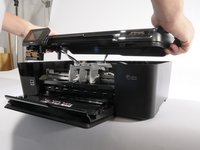
    • With a partner's help:

    • Have one person lift the hood 2-3 inches.

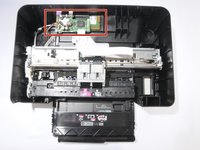
    • Have the other person disconnect the three cables from the motherboard (the green PCB) to the hood by gently pulling upward on them.

    • Remove the hood completely.

결론

To reassemble your device, follow these instructions in reverse order.

다른 한 분이 해당 안내서를 완성하였습니다.

작성자

16다른 기여자 명과 함께

Alessandro Andreatta

회원 가입일: 04/01/11

111 평판

안내서 1개를 작성함

Cal Poly, Team 10-38, Forte Spring 2011 Cal Poly, Team 10-38, Forte Spring 2011 회원

CPSU-FORTE-S11S10G38

5 회원들

안내서 10개를 작성함

0가이드 댓글

댓글 쓰기

조회 통계:

지난 24시간: 0

지난 7일: 4

지난 30일: 14

전체 시간: 3,365