주요 콘텐츠로 건너뛰기

HP Windows Mixed Reality Controllers TPC-Q044 Main Circuit Board Replacement

필요한 것

  1. HP Windows Mixed Reality Controllers TPC-Q044 Main Circuit Board Replacement, Batteries: 1 단계, 이미지 3개 중 1개 HP Windows Mixed Reality Controllers TPC-Q044 Main Circuit Board Replacement, Batteries: 1 단계, 이미지 3개 중 2개 HP Windows Mixed Reality Controllers TPC-Q044 Main Circuit Board Replacement, Batteries: 1 단계, 이미지 3개 중 3개
    • Slide the rear compartment cover in the direction of the arrow.

    • If replacing batteries, ensure the (+) and (-) on the battery match the (+) and (-) labeled in the battery compartment.

  2. HP Windows Mixed Reality Controllers TPC-Q044 Main Circuit Board Replacement, Shell: 2 단계, 이미지 2개 중 1개 HP Windows Mixed Reality Controllers TPC-Q044 Main Circuit Board Replacement, Shell: 2 단계, 이미지 2개 중 2개
    • Remove the four 4mm screws using a Phillips #00 screwdriver.

  3. HP Windows Mixed Reality Controllers TPC-Q044 Main Circuit Board Replacement: 3 단계, 이미지 3개 중 1개 HP Windows Mixed Reality Controllers TPC-Q044 Main Circuit Board Replacement: 3 단계, 이미지 3개 중 2개 HP Windows Mixed Reality Controllers TPC-Q044 Main Circuit Board Replacement: 3 단계, 이미지 3개 중 3개
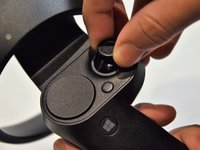
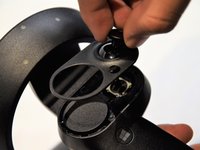
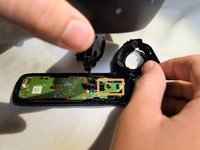
    • Grip the main body and pull the joystick outwards until the entire front panel pops off.

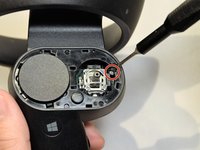
    • Remove the 6mm screw in the corner of the joystick well using a Phillips #00 screwdriver.

  4. HP Windows Mixed Reality Controllers TPC-Q044 Main Circuit Board Replacement: 4 단계, 이미지 2개 중 1개 HP Windows Mixed Reality Controllers TPC-Q044 Main Circuit Board Replacement: 4 단계, 이미지 2개 중 2개
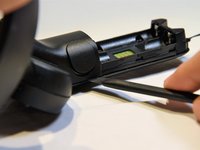
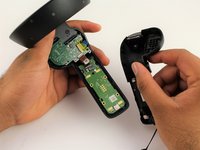
    • Use a spudger to pry apart the two halves of the assembly.

    • Work slowly, prying a small section at a time until the halves are completely separated.

  5. HP Windows Mixed Reality Controllers TPC-Q044 Main Circuit Board Replacement, Small Circuit Board: 5 단계, 이미지 2개 중 1개 HP Windows Mixed Reality Controllers TPC-Q044 Main Circuit Board Replacement, Small Circuit Board: 5 단계, 이미지 2개 중 2개
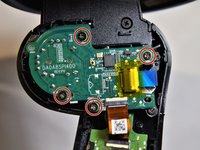
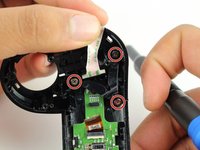
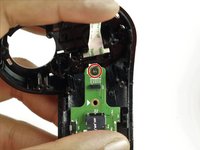
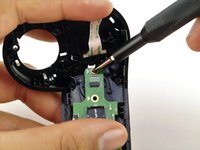
    • Using a Phillips #00 screwdriver, remove the four 4mm screws located on the joystick circuit board underneath the top half of the controller.

  6. HP Windows Mixed Reality Controllers TPC-Q044 Main Circuit Board Replacement: 6 단계, 이미지 3개 중 1개 HP Windows Mixed Reality Controllers TPC-Q044 Main Circuit Board Replacement: 6 단계, 이미지 3개 중 2개 HP Windows Mixed Reality Controllers TPC-Q044 Main Circuit Board Replacement: 6 단계, 이미지 3개 중 3개
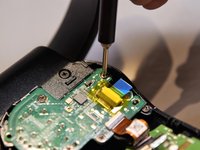
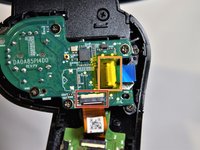
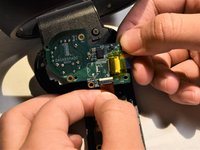
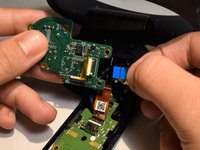
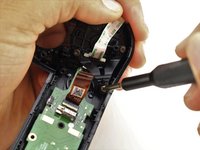
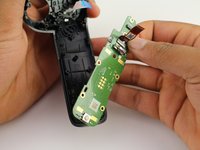
    • Remove the orange flat cable by pulling the orange tab parallel to the circuit board.

    • Release the blue flat cable by lifting up the white latch with a spudger.

  7. HP Windows Mixed Reality Controllers TPC-Q044 Main Circuit Board Replacement, Main Circuit Board: 7 단계, 이미지 3개 중 1개 HP Windows Mixed Reality Controllers TPC-Q044 Main Circuit Board Replacement, Main Circuit Board: 7 단계, 이미지 3개 중 2개 HP Windows Mixed Reality Controllers TPC-Q044 Main Circuit Board Replacement, Main Circuit Board: 7 단계, 이미지 3개 중 3개
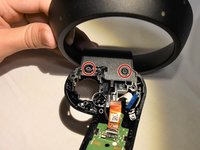
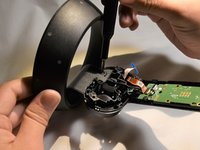
    • Remove the two 6mm screws at the base of the ring using a Phillips #0 screwdriver.

    • Pull towards the base of the controller to release the black wire from the connector on the circuit board.

    • Pull the ring apart from the rest of the controller.

  8. HP Windows Mixed Reality Controllers TPC-Q044 Main Circuit Board Replacement: 8 단계, 이미지 3개 중 1개 HP Windows Mixed Reality Controllers TPC-Q044 Main Circuit Board Replacement: 8 단계, 이미지 3개 중 2개 HP Windows Mixed Reality Controllers TPC-Q044 Main Circuit Board Replacement: 8 단계, 이미지 3개 중 3개
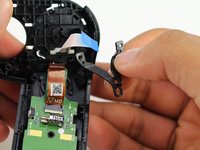
    • Remove the two 3mm screws on the V-clip using a Phillips #00 screwdriver.

    • Remove the V-clip from the device.

  9. HP Windows Mixed Reality Controllers TPC-Q044 Main Circuit Board Replacement: 9 단계, 이미지 3개 중 1개 HP Windows Mixed Reality Controllers TPC-Q044 Main Circuit Board Replacement: 9 단계, 이미지 3개 중 2개 HP Windows Mixed Reality Controllers TPC-Q044 Main Circuit Board Replacement: 9 단계, 이미지 3개 중 3개
    • With the V-clip off of the controller, use a Phillips #00 screwdriver to remove the remaining 4mm screw.

    • Remove the circuit board.

결론

To reassemble your device, follow these instructions in reverse order.

다른 4명이 해당 안내서를 완성하였습니다.

작성자

4다른 기여자 명과 함께

Eeshan Mishra

회원 가입일: 01/24/19

424 평판

안내서 4개를 작성함

1가이드 댓글

Awesome! But were do you get the components to replace from??

Since separate controllers are very difficult to find and expensive (You wont find Samsung ones) I will be interested to buy a few to do repairs to friends and so.

Baba Nam Kevalam - 답글

댓글 쓰기

조회 통계:

지난 24시간: 0

지난 7일: 10

지난 30일: 22

전체 시간: 2,199