주요 콘텐츠로 건너뛰기

HP Z2 Mini G3 Power On/Off and HDD Activity LED Replacement

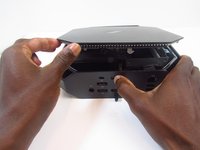
  1. HP Z2 Mini G3 Power On/Off and HDD Activity LED Replacement, Access Panel: 1 단계, 이미지 1개 중 1개
    • Turn the device so the back-side of the device is facing you.

    • Be sure that the power is off and the A/C power cord has been disconnected before starting. Removing hardware while the power is on could damage the device or harm yourself.

    • Components of the device are subject to static damage. Work on a hard, grounded surface to prevent damage to the workstation.

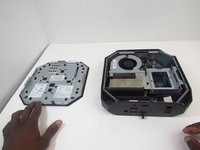
  2. HP Z2 Mini G3 Power On/Off and HDD Activity LED Replacement: 2 단계, 이미지 2개 중 1개 HP Z2 Mini G3 Power On/Off and HDD Activity LED Replacement: 2 단계, 이미지 2개 중 2개
    • Slide and hold the latch in the direction of the engraved arrow (to the right).

  3. HP Z2 Mini G3 Power On/Off and HDD Activity LED Replacement: 3 단계, 이미지 2개 중 1개 HP Z2 Mini G3 Power On/Off and HDD Activity LED Replacement: 3 단계, 이미지 2개 중 2개
    • While holding the latch, lift the access panel upwards and towards yourself and set it aside upside-down.

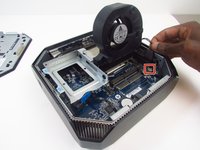
  4. HP Z2 Mini G3 Power On/Off and HDD Activity LED Replacement, CPU Fan: 4 단계, 이미지 1개 중 1개
    • Rotate the device so the front side is facing you (the side with the power button) and locate the CPU fan.

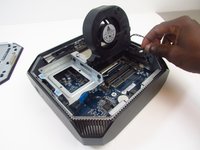
  5. HP Z2 Mini G3 Power On/Off and HDD Activity LED Replacement: 5 단계, 이미지 1개 중 1개
    • Swing the fan upward, to a 90-degree angle.

  6. HP Z2 Mini G3 Power On/Off and HDD Activity LED Replacement: 6 단계, 이미지 2개 중 1개 HP Z2 Mini G3 Power On/Off and HDD Activity LED Replacement: 6 단계, 이미지 2개 중 2개
    • Carefully disconnect the CPU fan by pulling out the wires from the motherboard.

  7. HP Z2 Mini G3 Power On/Off and HDD Activity LED Replacement: 7 단계, 이미지 1개 중 1개
    • Swing the fan back down and carefully unhook the CPU fan notches by pulling each tab away from the heat sink holes.

  8. HP Z2 Mini G3 Power On/Off and HDD Activity LED Replacement: 8 단계, 이미지 1개 중 1개
    • Swing the fan up again and pull it out.

  9. HP Z2 Mini G3 Power On/Off and HDD Activity LED Replacement, Power on/off Button and HDD Activity LED: 9 단계, 이미지 1개 중 1개
    • Remove HDD activity LED from retaining clip.

  10. HP Z2 Mini G3 Power On/Off and HDD Activity LED Replacement: 10 단계, 이미지 1개 중 1개
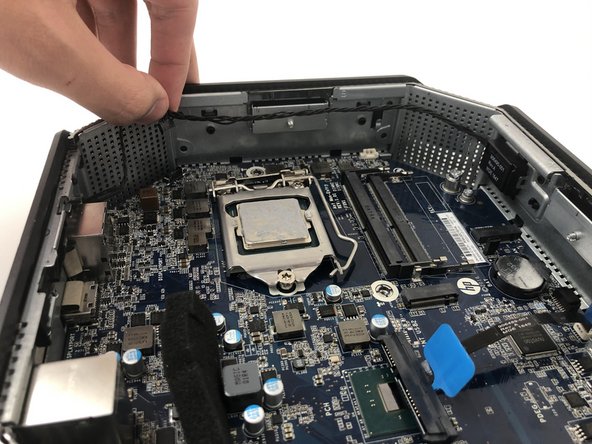
    • Grab and lift the cable off of the motherboard and chassis.

  11. HP Z2 Mini G3 Power On/Off and HDD Activity LED Replacement: 11 단계, 이미지 1개 중 1개
    • Pull the HDD activity LED out of the chassis.

  12. HP Z2 Mini G3 Power On/Off and HDD Activity LED Replacement: 12 단계, 이미지 1개 중 1개
    • Pull the cable from the motherboard to finish removing the component.

결론

To reassemble your device, follow these instructions in reverse order.

작성자

2다른 기여자 명과 함께

Sympson Placide

회원 가입일: 01/14/20

315 평판

안내서 2개를 작성함

0가이드 댓글

댓글 쓰기

조회 통계:

지난 24시간: 0

지난 7일: 6

지난 30일: 34

전체 시간: 1,420