주요 콘텐츠로 건너뛰기

Hama uRage Mobile Gaming Mouse Right click microswitch Replacement

필요한 것

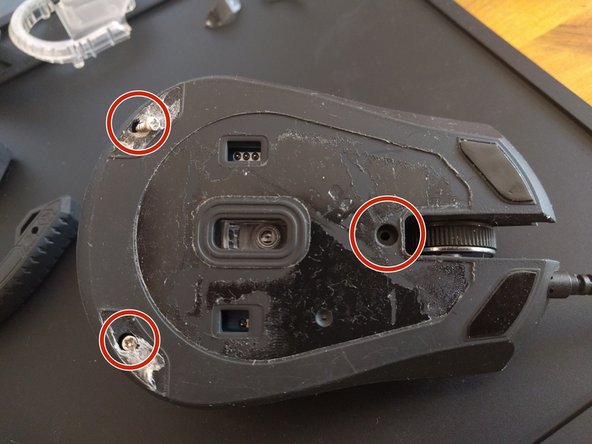
  1. Hama uRage Mobile Gaming Mouse Right click microswitch Replacement, How to open the case: 1 단계, 이미지 1개 중 1개
    • Take the sticker off and locate middle screw, two other screws are under the teflon pads

    • undo the screws

  2. Hama uRage Mobile Gaming Mouse Right click microswitch Replacement: 2 단계, 이미지 1개 중 1개
    • Take the top cover off, please be careful now to break the plastic hinges

    • If you break them you can use any superglue and a lot of patience to put them together since the case is made of ABS so it is easy to glue with any solvants

  3. Hama uRage Mobile Gaming Mouse Right click microswitch Replacement: 3 단계, 이미지 1개 중 1개
    • Disconnect the top cover switch ribbon

    • Remove two screws holding the PCB

    • Carefully remove the spinning wheel

  4. Hama uRage Mobile Gaming Mouse Right click microswitch Replacement: 4 단계, 이미지 1개 중 1개
    • Locate the right switch ( right double click problem )

  5. Hama uRage Mobile Gaming Mouse Right click microswitch Replacement: 5 단계, 이미지 1개 중 1개
    • Desolder the old switch using solder wick or braided wire covered in flux, use a little amount of solder to make the process easier and quicker, move the wick slowly in one direction to dispose the solder joint onto it

  6. Hama uRage Mobile Gaming Mouse Right click microswitch Replacement: 6 단계, 이미지 1개 중 1개
    • Insert another - operational 3 pin micro switch ( I got mine from some other recycled mouses )

  7. Hama uRage Mobile Gaming Mouse Right click microswitch Replacement: 7 단계, 이미지 1개 중 1개
    • Solder only two first pins like this, and clean the excess flux with any sort on alcohol or solvent so it will not corrode the joint in the future.

  8. Hama uRage Mobile Gaming Mouse Right click microswitch Replacement: 8 단계, 이미지 2개 중 1개 Hama uRage Mobile Gaming Mouse Right click microswitch Replacement: 8 단계, 이미지 2개 중 2개
    • Put the mouse together and test it first before replacing the label and teflon sliders

    • Additionally if you want to make the job look professional you can replace the double sided tape and teflon sliders with a new ones, but cleaning old one off and using some superglue may do the trick

    • Using the opportunity of opening the case ie you can also give it a clean, the best cleaning solution might be IPA

    • The possible cause of this double click problem is probably used up connector inside of the microswitch or bend copper plate if someone used too much force on it, it might be possible to fix it by bending and cleaning it but there would be a risk that it will happen again shortly, it is better to replace it - it is also quicker

결론

To reassemble your device, follow these instructions in reverse order.

작성자

2다른 기여자 명과 함께

P S

회원 가입일: 05/14/17

101 평판

안내서 1개를 작성함

0가이드 댓글

댓글 쓰기

조회 통계:

지난 24시간: 0

지난 7일: 0

지난 30일: 3

전체 시간: 2,124