주요 콘텐츠로 건너뛰기
수리 커뮤니티 가입 - 계정 만들기

Hipstreet Titan Plus Motherboard Replacement

필요한 것

  1. Hipstreet Titan Plus Motherboard Replacement, Motherboard: 1 단계, 이미지 2개 중 1개 Hipstreet Titan Plus Motherboard Replacement, Motherboard: 1 단계, 이미지 2개 중 2개
    • Use the plastic opening tools to pry the screen from the back of the device.

  2. Hipstreet Titan Plus Motherboard Replacement: 2 단계, 이미지 1개 중 1개
    • Use the spudger to remove the speaker from the back casing of the device.

  3. Hipstreet Titan Plus Motherboard Replacement: 3 단계, 이미지 1개 중 1개
    이 단계에 사용된 도구:
    Tweezers
    $4.99
    • Remove the black adhesive strips from the wires using the tweezers, and set the strips aside.

  4. Hipstreet Titan Plus Motherboard Replacement: 4 단계, 이미지 2개 중 1개 Hipstreet Titan Plus Motherboard Replacement: 4 단계, 이미지 2개 중 2개
    • Use the spudger to release three (3) black clips connecting the components to the motherboard.

  5. Hipstreet Titan Plus Motherboard Replacement: 5 단계, 이미지 2개 중 1개 Hipstreet Titan Plus Motherboard Replacement: 5 단계, 이미지 2개 중 2개
    • Unscrew the motherboard using a JIS #0 screwdriver.

  6. Hipstreet Titan Plus Motherboard Replacement: 6 단계, 이미지 2개 중 1개 Hipstreet Titan Plus Motherboard Replacement: 6 단계, 이미지 2개 중 2개
    • Use a nylon spudger to remove the battery from the back of the screen.

  7. Hipstreet Titan Plus Motherboard Replacement: 7 단계, 이미지 2개 중 1개 Hipstreet Titan Plus Motherboard Replacement: 7 단계, 이미지 2개 중 2개
    • Use the soldering iron to heat the end of the wires connecting the speaker to the motherboard.

    • Apply heat until the wires are free.

  8. Hipstreet Titan Plus Motherboard Replacement: 8 단계, 이미지 2개 중 1개 Hipstreet Titan Plus Motherboard Replacement: 8 단계, 이미지 2개 중 2개
    • Using the soldering iron, apply heat to the end of the wires until they are free from the motherboard.

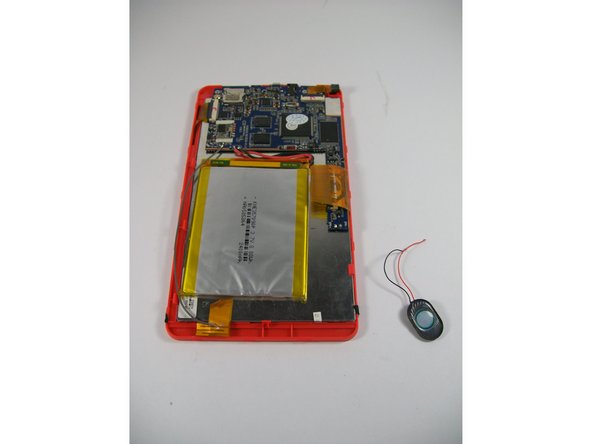
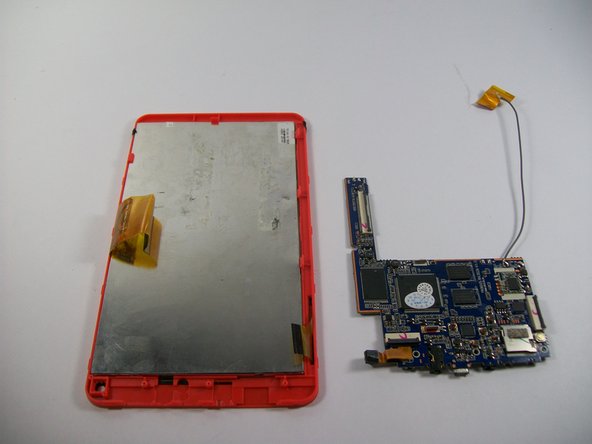
  9. Hipstreet Titan Plus Motherboard Replacement: 9 단계, 이미지 2개 중 1개 Hipstreet Titan Plus Motherboard Replacement: 9 단계, 이미지 2개 중 2개
    • Now that the battery and speaker are removed, the black clips are undone, and the motherboard is unscrewed, remove the motherboard.

결론

To reassemble your device, follow these instructions in reverse order.

다른 한 분이 해당 안내서를 완성하였습니다.

작성자

8다른 기여자 명과 함께

Kari Cannon

회원 가입일: 10/30/15

500 평판

안내서 4개를 작성함

UMass Dartmouth, Team 1-1, Miles Fall 2015 UMass Dartmouth, Team 1-1, Miles Fall 2015 회원

UMASSD-MILES-F15S1G1

3 회원들

안내서 10개를 작성함

0가이드 댓글

댓글 쓰기

조회 통계:

지난 24시간: 0

지난 7일: 7

지난 30일: 12

전체 시간: 466