주요 콘텐츠로 건너뛰기

How to Fix a Razer Naga Trinity Click Button

필요한 것

  1. How to Fix a Razer Naga Trinity Click Button, How to Fix a Razer Naga Trinity Click Button: 1 단계, 이미지 3개 중 1개 How to Fix a Razer Naga Trinity Click Button, How to Fix a Razer Naga Trinity Click Button: 1 단계, 이미지 3개 중 2개 How to Fix a Razer Naga Trinity Click Button, How to Fix a Razer Naga Trinity Click Button: 1 단계, 이미지 3개 중 3개
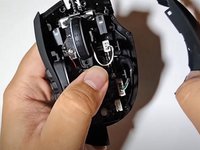
    • Remove the three pads from the bottom of the mouse.

    • Remove the four screws beneath the pads using a JIS #1 screwdriver.

  2. How to Fix a Razer Naga Trinity Click Button: 2 단계, 이미지 2개 중 1개 How to Fix a Razer Naga Trinity Click Button: 2 단계, 이미지 2개 중 2개
    • Press the top of mouse and pull back to disconnect the mouse shell.

    • Pull out the cord that connects the RGB button.

  3. How to Fix a Razer Naga Trinity Click Button: 3 단계, 이미지 2개 중 1개 How to Fix a Razer Naga Trinity Click Button: 3 단계, 이미지 2개 중 2개
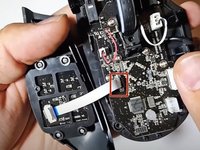
    • Remove the right shell.

    • Disconnect the cable connecting the left shell to the mouse.

    • Remove the left shell.

  4. How to Fix a Razer Naga Trinity Click Button: 4 단계, 이미지 1개 중 1개
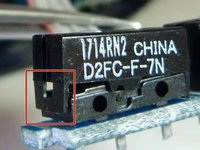
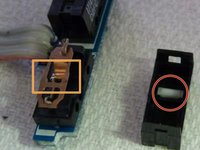
    • Use a safety pin to unlatch the clicker buttons.

  5. How to Fix a Razer Naga Trinity Click Button: 5 단계, 이미지 2개 중 1개 How to Fix a Razer Naga Trinity Click Button: 5 단계, 이미지 2개 중 2개
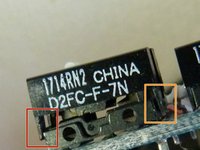
    • Insert the open safety pin to lift one side latch slightly.

    • Do not open the whole part.

    • Repeat for the other side.

  6. How to Fix a Razer Naga Trinity Click Button: 6 단계, 이미지 3개 중 1개 How to Fix a Razer Naga Trinity Click Button: 6 단계, 이미지 3개 중 2개 How to Fix a Razer Naga Trinity Click Button: 6 단계, 이미지 3개 중 3개
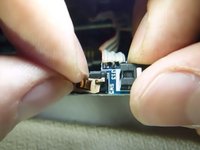
    • Remove the clicker and white pin.

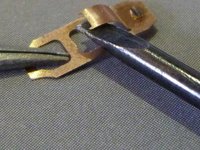
    • Gently press the middle part of the copper sheet until it unhooks itself.

    • Pull the bended part of the copper sheet back.

  7. How to Fix a Razer Naga Trinity Click Button: 7 단계, 이미지 1개 중 1개
    • Reassemble the copper sheet with the white pin seated properly.

    • Push the spring down into its place using a spudger.

    • You will hear a click sound if you successfully assemble it.

결론

To reassemble your device, follow these instructions in reverse order.

다른 4명이 해당 안내서를 완성하였습니다.

작성자

1다른 기여자 명과 함께

Haoran Ke

회원 가입일: 01/13/22

283 평판

안내서 1개를 작성함

York University, Team S-12, Woodhouse Winter 2022 York University, Team S-12, Woodhouse Winter 2022 회원

YORK-WOODHOUSE-W22SSG12

1 회원

안내서 4개를 작성함

1가이드 댓글

On the latest version of the mouse, the clicker button can no longer be opened...

Jérémie PLAYOUT - 답글

댓글 쓰기

조회 통계:

지난 24시간: 10

지난 7일: 63

지난 30일: 271

전체 시간: 14,118