주요 콘텐츠로 건너뛰기
수리 커뮤니티 가입 - 계정 만들기

How to Remove scratches from a CD

필요한 것

    1. How to Remove scratches from a CD, How to Remove scratches from a CD: 1 단계, 이미지 1개 중 1개
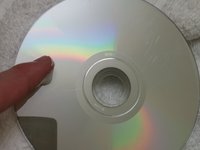
      • Identify any scratches.

      • Some scratches may be too deep to be removed. In this case, this method may not work.

      댓글 쓰기

    2. How to Remove scratches from a CD: 2 단계, 이미지 2개 중 1개 How to Remove scratches from a CD: 2 단계, 이미지 2개 중 2개
      • Take the CD to the sink.

      • Wash with lukewarm water to remove any dust or dirt.

      댓글 쓰기

    3. How to Remove scratches from a CD: 3 단계, 이미지 1개 중 1개
      • Let the CD air dry, or dry with towel.

      • Use a non-linen towel or your CD will need to be washed again.

      댓글 쓰기

    4. How to Remove scratches from a CD: 4 단계, 이미지 3개 중 1개 How to Remove scratches from a CD: 4 단계, 이미지 3개 중 2개 How to Remove scratches from a CD: 4 단계, 이미지 3개 중 3개
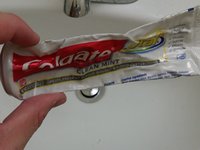
      • Take the toothpaste, and apply it to your index finger.

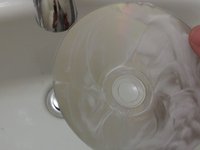
      • Rinse the toothpaste in lukewarm water and apply to the CD.

      • Rub toothpaste in a circular motion from the center to the outer edge.

      • Add multiple layers of toothpaste to cover all of the scratches.

      • Use a white toothpaste, not a gel. Gels containing little beads may cause more damage to the CD.

      댓글 쓰기

    5. How to Remove scratches from a CD: 5 단계, 이미지 1개 중 1개
      • Let the CD sit for 2 to 3 minutes.

      댓글 쓰기

    6. How to Remove scratches from a CD: 6 단계, 이미지 1개 중 1개
      • Rinse off the toothpaste with lukewarm water.

      댓글 쓰기

    7. How to Remove scratches from a CD: 7 단계, 이미지 1개 중 1개
      • Let the CD air dry, or dry with a non-linen towel.

      • Use a non-linen towel or your CD will need to be washed again.

      댓글 쓰기

    8. How to Remove scratches from a CD: 8 단계, 이미지 1개 중 1개
      • Inspect your disk.

      • If your disk still has scratches, repeat the process.

      • You could also try to burn the disk onto another disk if the disk is lagging.

      댓글 쓰기

결론

To reassemble your device, follow these instructions in reverse order.

취소: 해당 안내서를 완성하지 않았습니다.

다른 53명이 해당 안내서를 완성하였습니다.

작성자

3다른 기여자 명과 함께

Nick Jones

회원 가입일: 09/29/15

1,701 평판

안내서 1개를 작성함

Cal Poly, Team 14-4, Green Fall 2015 Cal Poly, Team 14-4, Green Fall 2015 회원

CPSU-GREEN-F15S14G4

5 회원들

안내서 60개를 작성함

5가이드 댓글

Works great!

Paul Johnson - 답글 공유

thank youuuuuuuuu

aboabdo.2007 - 답글 공유

Funziona anche con i DVD di film e videogiochi questo procedimento? Oppure è solo specifico per i CD?

Francesco Pepe - 답글 공유

It did not work for me

Leisy Madrigal - 답글 공유

Me Funciono muy bien, gracias!

Esteban Montero - 답글 공유

댓글 쓰기

조회 통계:

지난 24시간: 44

지난 7일: 436

지난 30일: 1,637

전체 시간: 100,278