소개
This guide provides detailed instructions for repairing broken fairy lights, often caused by a faulty wire connecting the individual light bulbs. By identifying and addressing the damaged section, you can restore functionality to your lights. This guide will walk you through the process of reconnecting the wires and ensuring a continuous flow of current using a soldering iron.
Fairy lights are frequently used to celebrate festive occasions, decorate living spaces, or mark special events. However, the delicate nature of these wires makes them susceptible to breakage under pressure. Instead of replacing these lights, investing in a soldering iron set can equip you for various electronic repairs. Additionally, engaging in this repair process can serve as an intriguing and educational experiment.
Follow through the guide carefully to ensure a successful and safe repair.
In order to implement this guide successfully, it is essential that you have the knowledge of soldering connections and stripping wire.
Links attached:
Soldering: 연결부 납땜 및 납제거 방법
Wire stripping: 전선 피복 벗기기
필요한 것
-
-
Identify the damaged part of the fairy lights and ensure they are disconnected from the USB with no current flowing.
-
-


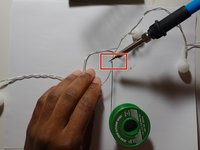
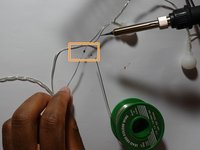

By following these steps, you should be able to repair your fairy lights and enjoy their glow once again.



팀

York University, Team 1-18, O'Regan Summer 2024 York University, Team 1-18, O'Regan Summer 2024 회원
YORK-O'REGAN-SU24S1G18
1 회원
안내서 1개 작성
