주요 콘텐츠로 건너뛰기

Huawei MediaPad M3 Rear Camera Replacement

필요한 것

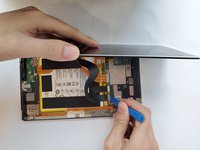
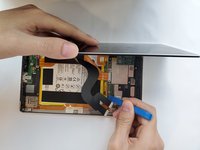
  1. Huawei MediaPad M3 Rear Camera Replacement, Display Assembly: 1 단계, 이미지 2개 중 1개 Huawei MediaPad M3 Rear Camera Replacement, Display Assembly: 1 단계, 이미지 2개 중 2개
    • Use a heat gun to heat the display. It may take up to 30 seconds.

    • Slide in the opening picks to the four corners of the tablet and peel off the display carefully.

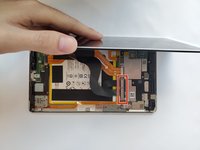
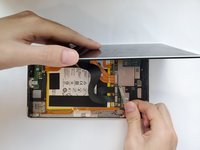
  2. Huawei MediaPad M3 Rear Camera Replacement: 2 단계, 이미지 2개 중 1개 Huawei MediaPad M3 Rear Camera Replacement: 2 단계, 이미지 2개 중 2개
    • Open the display carefully.

    • Use a Phillips #00 screwdriver to remove the two 3.0mm screws.

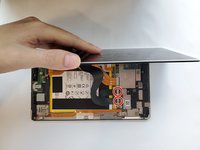
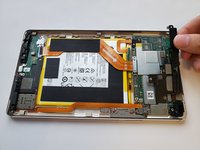
  3. Huawei MediaPad M3 Rear Camera Replacement: 3 단계, 이미지 2개 중 1개 Huawei MediaPad M3 Rear Camera Replacement: 3 단계, 이미지 2개 중 2개
    • After removing the two screws, use your hand to take out the silver metal bracket.

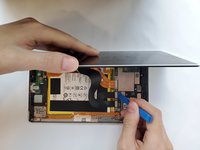
  4. Huawei MediaPad M3 Rear Camera Replacement: 4 단계, 이미지 3개 중 1개 Huawei MediaPad M3 Rear Camera Replacement: 4 단계, 이미지 3개 중 2개 Huawei MediaPad M3 Rear Camera Replacement: 4 단계, 이미지 3개 중 3개
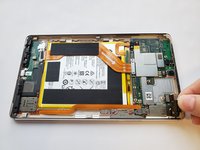
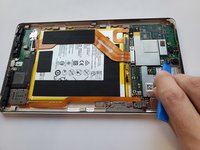
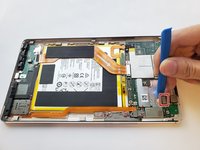
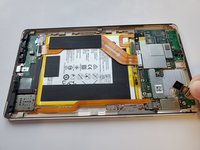
    • Use the plastic opening tool to disconnect the two ribbon cable connectors.

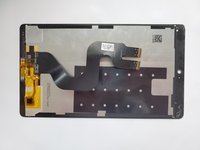
  5. Huawei MediaPad M3 Rear Camera Replacement: 5 단계, 이미지 2개 중 1개 Huawei MediaPad M3 Rear Camera Replacement: 5 단계, 이미지 2개 중 2개
    • Remove the display assembly from the device.

  6. Huawei MediaPad M3 Rear Camera Replacement, Front Camera: 6 단계, 이미지 1개 중 1개
    • Use a Phillips #00 screwdriver to remove the six 3.0mm screws.

  7. Huawei MediaPad M3 Rear Camera Replacement: 7 단계, 이미지 1개 중 1개
    • Use your hand to remove the silver metal bracket.

  8. Huawei MediaPad M3 Rear Camera Replacement: 8 단계, 이미지 2개 중 1개 Huawei MediaPad M3 Rear Camera Replacement: 8 단계, 이미지 2개 중 2개
    • Use your hand to remove the two black plastic covers.

  9. Huawei MediaPad M3 Rear Camera Replacement: 9 단계, 이미지 3개 중 1개 Huawei MediaPad M3 Rear Camera Replacement: 9 단계, 이미지 3개 중 2개 Huawei MediaPad M3 Rear Camera Replacement: 9 단계, 이미지 3개 중 3개
    • Use a plastic opening tool to remove the front camera.

  10. Huawei MediaPad M3 Rear Camera Replacement, Rear Camera: 10 단계, 이미지 3개 중 1개 Huawei MediaPad M3 Rear Camera Replacement, Rear Camera: 10 단계, 이미지 3개 중 2개 Huawei MediaPad M3 Rear Camera Replacement, Rear Camera: 10 단계, 이미지 3개 중 3개
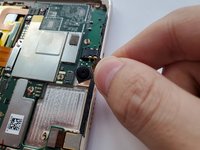
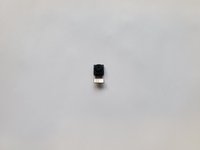
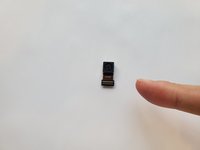
    • Disconnect and remove the camera from the motherboard.

결론

To reassemble your device, follow these instructions in reverse order.

0가이드 댓글

댓글 쓰기

조회 통계:

지난 24시간: 0

지난 7일: 0

지난 30일: 8

전체 시간: 485