주요 콘텐츠로 건너뛰기

IBM ThinkPad 380 and 385 Battery Replacement

필요한 것

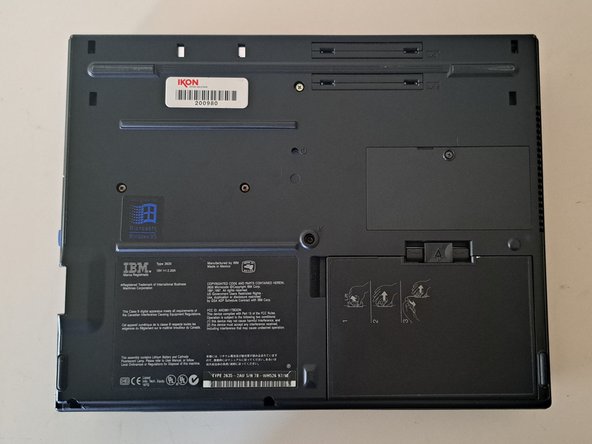
  1. IBM ThinkPad 380 and 385 Battery Replacement, Flip the ThinkPad over.: 1 단계, 이미지 2개 중 1개 IBM ThinkPad 380 and 385 Battery Replacement, Flip the ThinkPad over.: 1 단계, 이미지 2개 중 2개
    • Weighing in at an enormous 7 and a half pounds, this big black brick is definitely one of the thickest of the ThinkPad line.

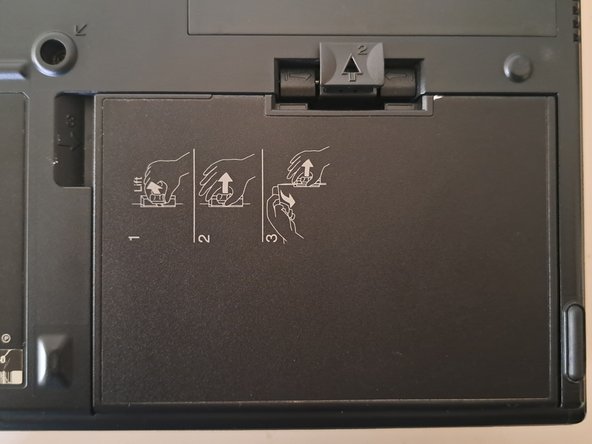
  2. IBM ThinkPad 380 and 385 Battery Replacement, The Battery Release Tab: 2 단계, 이미지 2개 중 1개 IBM ThinkPad 380 and 385 Battery Replacement, The Battery Release Tab: 2 단계, 이미지 2개 중 2개
    • Pull the battery tab up and forward.

    • (You can also just follow the printed instructions on the battery itself.)

  3. IBM ThinkPad 380 and 385 Battery Replacement, Pull the Battery out.: 3 단계, 이미지 1개 중 1개
    • Pull the battery out.

    • You may have to pull quite firmly to get it to budge.

결론

To reassemble your device, follow these instructions in reverse order.

작성자

1다른 기여자 명과 함께

Cooper Quintrall

회원 가입일: 03/15/22

113 평판

안내서 1개를 작성함

0가이드 댓글

댓글 쓰기

조회 통계:

지난 24시간: 3

지난 7일: 5

지난 30일: 15

전체 시간: 205