주요 콘텐츠로 건너뛰기
수리 커뮤니티 가입 - 계정 만들기

Kyocera Hydro Vibe SIM Card Replacement

필요한 것

  1. Kyocera Hydro Vibe SIM Card Replacement, Battery: 1 단계, 이미지 1개 중 1개
    • Make sure that the device is turned off before beginning.

    • Look for a small indentation on the bottom of the phone.

    • Insert the plastic opening tool into the indentation and lift off the back casing.

  2. Kyocera Hydro Vibe SIM Card Replacement: 2 단계, 이미지 3개 중 1개 Kyocera Hydro Vibe SIM Card Replacement: 2 단계, 이미지 3개 중 2개 Kyocera Hydro Vibe SIM Card Replacement: 2 단계, 이미지 3개 중 3개
    • The large white component is the battery. Look for a small indentation under the arrow that says "LIFT."

    • Place the plastic opening tool in the indentation and lift the battery out of the socket.

  3. Kyocera Hydro Vibe SIM Card Replacement, SIM Card: 3 단계, 이미지 1개 중 1개
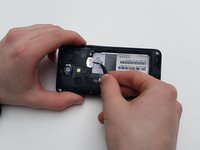
    • Locate the SIM card indicated by the arrows and picture.

  4. Kyocera Hydro Vibe SIM Card Replacement: 4 단계, 이미지 2개 중 1개 Kyocera Hydro Vibe SIM Card Replacement: 4 단계, 이미지 2개 중 2개
    • Use the precision tweezer set to safely remove the SIM card.

결론

To reassemble your device, follow these instructions in reverse order.

작성자

3다른 기여자 명과 함께

Kunal Patel

회원 가입일: 01/29/16

562 평판

안내서 3개를 작성함

0가이드 댓글

댓글 쓰기

조회 통계:

지난 24시간: 1

지난 7일: 7

지난 30일: 34

전체 시간: 893