주요 콘텐츠로 건너뛰기
수리 커뮤니티 가입 - 계정 만들기

LG L1200 Keypad Replacement

필요한 것

  1. LG L1200 Keypad Replacement, Logic Board: 1 단계, 이미지 1개 중 1개
    • Make sure you remove the battery by lifting the tab on the back of the phone before opening the case.

    • Poke out rubber covers using a spudger or pointy object, such as a thumb tack.

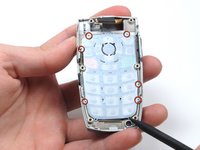
  2. LG L1200 Keypad Replacement: 2 단계, 이미지 1개 중 1개
    • Use a T6 torx screwdriver to unscrew the 6 screws that hold the back casing on.

  3. LG L1200 Keypad Replacement: 3 단계, 이미지 1개 중 1개
    • Use IPod opening tool to separate back housing.

    • There are two tabs located on either side of the phone.

  4. LG L1200 Keypad Replacement: 4 단계, 이미지 1개 중 1개
    • Separate the back housing from the phone.

    • Be careful not to rip out the wire (highlighted in yellow) when separating the back housing.

  5. LG L1200 Keypad Replacement: 5 단계, 이미지 1개 중 1개
    • Use a spudger to disconnect antenna wire.

  6. LG L1200 Keypad Replacement: 6 단계, 이미지 1개 중 1개
    • Use the IPod opening tool to pop out the logic board.

  7. LG L1200 Keypad Replacement: 7 단계, 이미지 1개 중 1개
    • Use the IPod opening tool to disconnect the main ribbon.

  8. LG L1200 Keypad Replacement: 8 단계, 이미지 1개 중 1개
    • Once the ribbon is detached, remove the logic board and replace if necessary.

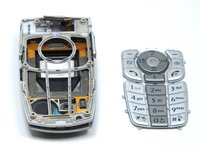
  9. LG L1200 Keypad Replacement, Keypad: 9 단계, 이미지 1개 중 1개
    • The back of the keypad is shown here, next to the logic board (the logic board is turned over to expose the buttons).

  10. LG L1200 Keypad Replacement: 10 단계, 이미지 2개 중 1개 LG L1200 Keypad Replacement: 10 단계, 이미지 2개 중 2개
    • Using a spudger, lift the keypad off of the tabs.

결론

To reassemble your device, follow these instructions in reverse order.

작성자

5다른 기여자 명과 함께

Joshua Herrmann

회원 가입일: 04/16/10

8 평판

안내서 8개를 작성함

Cal Poly, Team 6-14, Maness Spring 2010 Cal Poly, Team 6-14, Maness Spring 2010 회원

CPSU-MANESS-S10S6G14

4 회원들

안내서 16개를 작성함

0가이드 댓글

댓글 쓰기

조회 통계:

지난 24시간: 8

지난 7일: 15

지난 30일: 84

전체 시간: 1,357