주요 콘텐츠로 건너뛰기
수리 커뮤니티 가입 - 계정 만들기

LG env2 vx9100 Back Panel Replacement

필요한 것

  1. LG env2 vx9100 Back Panel Replacement, Battery: 1 단계, 이미지 3개 중 1개 LG env2 vx9100 Back Panel Replacement, Battery: 1 단계, 이미지 3개 중 2개 LG env2 vx9100 Back Panel Replacement, Battery: 1 단계, 이미지 3개 중 3개
    • Power off the phone before disassembly to avoid electric shock or fire.

    • Place the phone face down on the table.

    • Pull down the tab below the battery with your fingernail or an opening tool.

    • Lift the battery out.

  2. LG env2 vx9100 Back Panel Replacement, Back Panel: 2 단계, 이미지 2개 중 1개 LG env2 vx9100 Back Panel Replacement, Back Panel: 2 단계, 이미지 2개 중 2개
    • Use a metal spudger to remove the five rubber covers and expose the screws underneath.

  3. LG env2 vx9100 Back Panel Replacement: 3 단계, 이미지 2개 중 1개 LG env2 vx9100 Back Panel Replacement: 3 단계, 이미지 2개 중 2개
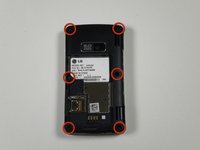
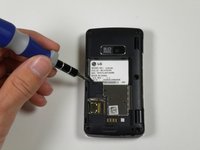
    • Remove all six 2.5 mm screws with a Phillips #00 screwdriver.

  4. LG env2 vx9100 Back Panel Replacement: 4 단계, 이미지 2개 중 1개 LG env2 vx9100 Back Panel Replacement: 4 단계, 이미지 2개 중 2개
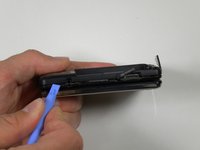
    • Insert a plastic opening tool into the seam and gently pry to release the tabs.

    • Work around the phone until all tabs are released.

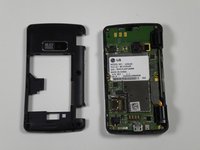
    • Remove the back panel.

결론

To reassemble your device, follow these instructions in reverse order.

다른 2명이 해당 안내서를 완성하였습니다.

작성자

10다른 기여자 명과 함께

Reed Williston

회원 가입일: 09/26/12

34 평판

안내서 7개를 작성함

Cal Poly, Team 16-55, Forte Fall 2012 Cal Poly, Team 16-55, Forte Fall 2012 회원

CPSU-FORTE-F12S16G55

5 회원들

안내서 14개를 작성함

0가이드 댓글

댓글 쓰기

조회 통계:

지난 24시간: 0

지난 7일: 7

지난 30일: 43

전체 시간: 1,072