주요 콘텐츠로 건너뛰기

LG gram (14Z980-A.AAS7U1) SSD Replacement

필요한 것

  1. LG gram (14Z980-A.AAS7U1) SSD Replacement, 1) Unscrew the back cover: 1 단계, 이미지 1개 중 1개
    • Ensure that your laptop is fully powered down and disconnected from any power source before starting the repair. Confirm that the laptop is not in standby, sleep, or hibernation mode.

    • Utilize a screwdriver to remove the fasteners that secure the back cover.

    • Remove the 8 rubber feet and screws.

  2. LG gram (14Z980-A.AAS7U1) SSD Replacement, Loosen the back cover: 2 단계, 이미지 2개 중 1개 LG gram (14Z980-A.AAS7U1) SSD Replacement, Loosen the back cover: 2 단계, 이미지 2개 중 2개
    • Insert a pry tool or your fingers between the back cover. Gently run the tool along the edges to release any clips or latches.

    • Apply gentle pressure to avoid damaging the case or components inside.

    • If you encounter significant resistance while trying to remove the back cover, it's possible that your model may have screws located beneath. Proceed cautiously by gently prying up the laptop to inspect for any more screws.

  3. LG gram (14Z980-A.AAS7U1) SSD Replacement, Remove the back cover: 3 단계, 이미지 2개 중 1개 LG gram (14Z980-A.AAS7U1) SSD Replacement, Remove the back cover: 3 단계, 이미지 2개 중 2개
    • Lift from the bottom and gently remove the back cover.

    • When putting the back cover back on, apply gentle pressure along the edges of the cover to ensure that the clips snap back into place.

  4. LG gram (14Z980-A.AAS7U1) SSD Replacement, Disconnect battery: 4 단계, 이미지 2개 중 1개 LG gram (14Z980-A.AAS7U1) SSD Replacement, Disconnect battery: 4 단계, 이미지 2개 중 2개
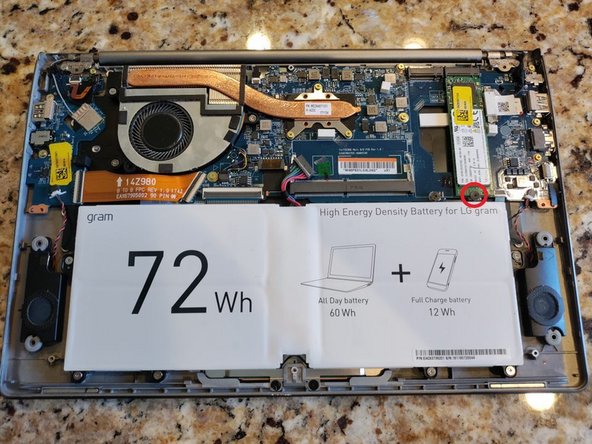
    • Carefully locate the battery connector within the laptop and gently detach it from its port by applying pressure and pulling it straight out.

  5. LG gram (14Z980-A.AAS7U1) SSD Replacement, Remove drive screw: 5 단계, 이미지 2개 중 1개 LG gram (14Z980-A.AAS7U1) SSD Replacement, Remove drive screw: 5 단계, 이미지 2개 중 2개
    • Utilize a Phillips screwdriver to unscrew the 2.8 mm-sized screw that secures the SSD onto the LG Gram's motherboard.

  6. LG gram (14Z980-A.AAS7U1) SSD Replacement, Disconnect drive: 6 단계, 이미지 2개 중 1개 LG gram (14Z980-A.AAS7U1) SSD Replacement, Disconnect drive: 6 단계, 이미지 2개 중 2개
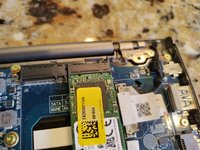
    • Carefully grip the SSD by its edges and gently pull it straight out.

    • Avoid any abrupt movements to prevent damage to the drive.

  7. LG gram (14Z980-A.AAS7U1) SSD Replacement, Connect new drive: 7 단계, 이미지 2개 중 1개 LG gram (14Z980-A.AAS7U1) SSD Replacement, Connect new drive: 7 단계, 이미지 2개 중 2개
    • Gently push the drive into the slot until it's snugly in place.

    • Apply even pressure to ensure a secure connection.

  8. LG gram (14Z980-A.AAS7U1) SSD Replacement, Screw in new drive: 8 단계, 이미지 1개 중 1개
    • Insert the screw and screw in the drive.

결론

To reassemble your device, follow these instructions in reverse order.

작성자

1다른 기여자 명과 함께

Derricka Jones

회원 가입일: 12/04/23

157 평판

안내서 1개를 작성함

0가이드 댓글

댓글 쓰기

조회 통계:

지난 24시간: 0

지난 7일: 22

지난 30일: 124

전체 시간: 1,527