소개
Does your Lenovo ThinkPad E570 laptop have a “no good device” error message, run excessively slow, have active apps often freeze/crash, or does the drive become read-only? If so, it is time to replace the solid state drive (SSD). Making sure your SSD is up-to-date and working fine will enhance your device’s ability to run apps and make sure optimum running speed is used.
Power down your laptop and disconnect from any external power sources before beginning this guide.
필요한 것


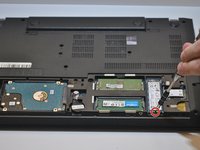
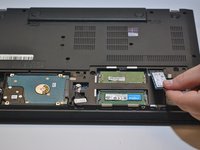
To reassemble your device, follow these instructions in reverse order.
다른 2명이 해당 안내서를 완성하였습니다.



팀

Western Carolina University, Team 1-1, Virtue Fall 2021 Western Carolina University, Team 1-1, Virtue Fall 2021 회원
WCU-VIRTUE-F21S1G1
4 회원들
안내서 5개를 작성함
