주요 콘텐츠로 건너뛰기

Lenovo ThinkPad X1 Carbon (2nd Gen) Touchpad Replacement

필요한 것

  1. Lenovo ThinkPad X1 Carbon (2nd Gen) Touchpad Replacement, Back Cover: 1 단계, 이미지 1개 중 1개
    • Using a Phillips #0 screwdriver, remove the seven 7mm screws holding the back cover onto your computer.

  2. Lenovo ThinkPad X1 Carbon (2nd Gen) Touchpad Replacement: 2 단계, 이미지 2개 중 1개 Lenovo ThinkPad X1 Carbon (2nd Gen) Touchpad Replacement: 2 단계, 이미지 2개 중 2개
    • Use a plastic opening tool or your fingers to pry off the cover.

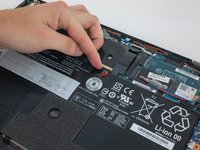
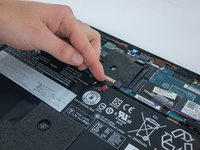
  3. Lenovo ThinkPad X1 Carbon (2nd Gen) Touchpad Replacement, Battery: 3 단계, 이미지 2개 중 1개 Lenovo ThinkPad X1 Carbon (2nd Gen) Touchpad Replacement, Battery: 3 단계, 이미지 2개 중 2개
    • Using your fingers, disconnect the battery from the motherboard.

  4. Lenovo ThinkPad X1 Carbon (2nd Gen) Touchpad Replacement: 4 단계, 이미지 1개 중 1개
    • Using a Phillips #0 screwdriver, unscrew the five 4.3mm screws attaching the battery to the computer.

  5. Lenovo ThinkPad X1 Carbon (2nd Gen) Touchpad Replacement: 5 단계, 이미지 1개 중 1개
    • Remove the battery by pulling it directly towards you.

  6. Lenovo ThinkPad X1 Carbon (2nd Gen) Touchpad Replacement, Touchpad: 6 단계, 이미지 1개 중 1개
    • Remove the black ribbon cable connected to the touchpad.

  7. Lenovo ThinkPad X1 Carbon (2nd Gen) Touchpad Replacement: 7 단계, 이미지 1개 중 1개
    • Use a Phillips #1 screwdriver to remove the four 1.9 mm screws holding in the touchpad.

  8. Lenovo ThinkPad X1 Carbon (2nd Gen) Touchpad Replacement: 8 단계, 이미지 1개 중 1개
    • Remove the touchpad by opening the computer and letting it drop onto your hand.

결론

To reassemble your device, follow these instructions in reverse order.

다른 한 분이 해당 안내서를 완성하였습니다.

작성자

1다른 기여자 명과 함께

Eevee Murdock

회원 가입일: 01/23/20

1,134 평판

안내서 6개를 작성함

Cal Poly, Team S18-G4, White Winter 2020 Cal Poly, Team S18-G4, White Winter 2020 회원

CPSU-WHITE-W20S18G4

4 회원들

안내서 9개를 작성함

2가이드 댓글

Even the weirder of their models is still amazingly engineered, this was so easy to do and finding parts - not only of the same model but compatible newer parts - was an absolute breeze! Was able to upgrade my laptop during my work lunchtime, and still have time to actually eat lunch!

Casey - 답글

Just to confirm - Thinkpad X1 Carbon Generation 3 touchpads are compatible with this model, and make for an amazing upgrade.

Casey - 답글

댓글 쓰기

조회 통계:

지난 24시간: 0

지난 7일: 3

지난 30일: 20

전체 시간: 2,120