주요 콘텐츠로 건너뛰기

Lenovo ThinkPad X1 Carbon 6th Gen Back Cover Replacement

필요한 것

  1. Lenovo ThinkPad X1 Carbon 6th Gen Back Cover Replacement, Back Cover: 1 단계, 이미지 2개 중 1개 Lenovo ThinkPad X1 Carbon 6th Gen Back Cover Replacement, Back Cover: 1 단계, 이미지 2개 중 2개
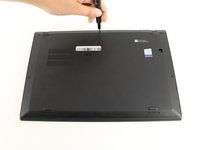
    • Use a Phillips #0 screwdriver to unscrew the five screws that secure the back cover to the laptop.

    • The screws do not completely come off from the back cover. Loosen until the screws are completely loose.

  2. Lenovo ThinkPad X1 Carbon 6th Gen Back Cover Replacement: 2 단계, 이미지 2개 중 1개 Lenovo ThinkPad X1 Carbon 6th Gen Back Cover Replacement: 2 단계, 이미지 2개 중 2개
    • Use a Jimmy to lift the cover directly up off of the locating pins.

    • Though a metal opening tool is shown in the image, we recommend using plastic opening tools to minimize any cosmetic damage.

    • Remove the back cover.

    • If you encounter resistance when lifting the cover, revisit the screws to see if any of them are still threaded on to the device.

결론

To reassemble your device, follow these instructions in reverse order.

다른 4명이 해당 안내서를 완성하였습니다.

작성자

6다른 기여자 명과 함께

Michael Megna

회원 가입일: 01/23/20

1,415 평판

안내서 7개를 작성함

Cal Poly, Team S19-G4, White Winter 2020 Cal Poly, Team S19-G4, White Winter 2020 회원

CPSU-WHITE-W20S19G4

3 회원들

안내서 25개를 작성함

0가이드 댓글

댓글 쓰기

조회 통계:

지난 24시간: 2

지난 7일: 9

지난 30일: 62

전체 시간: 3,298