주요 콘텐츠로 건너뛰기
수리 커뮤니티 가입 - 계정 만들기

Lenovo V14-ADA Back Panel Replacement

필요한 것

  1. Lenovo V14-ADA Back Panel Replacement, Back Panel: 1 단계, 이미지 1개 중 1개
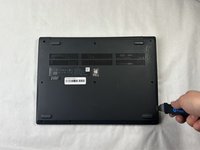
    • Turn off the laptop.

    • Disconnect the charging cable from the laptop.

    • Failure to unplug the cable could result in electric shock.

    • Flip the laptop upside down.

  2. Lenovo V14-ADA Back Panel Replacement: 2 단계, 이미지 1개 중 1개
    • Remove all ten 5 mm screws from the back panel using a JIS #0 screwdriver.

  3. Lenovo V14-ADA Back Panel Replacement: 3 단계, 이미지 2개 중 1개 Lenovo V14-ADA Back Panel Replacement: 3 단계, 이미지 2개 중 2개
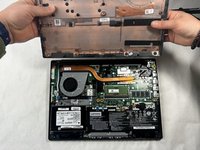
    • Place the Jimmy in the small crack between the back panel and the keyboard and push down.

    • Repeat this until the panel pops off.

결론

To reassemble your device, follow these instructions in reverse order.

Kristen Gismondi

회원 가입일: 11/12/14

104,271 평판

안내서 266개를 작성함

iFixit iFixit 회원

Staff

124 회원들

안내서 24,463개를 작성함

0가이드 댓글

댓글 쓰기

조회 통계:

지난 24시간: 0

지난 7일: 2

지난 30일: 14

전체 시간: 357