주요 콘텐츠로 건너뛰기

Logitech G703 Lightspeed Scroll Wheel Replacement

필요한 것
  1. Logitech G703 Lightspeed Scroll Wheel Replacement, Scroll Wheel: 1 단계, 이미지 2개 중 1개 Logitech G703 Lightspeed Scroll Wheel Replacement, Scroll Wheel: 1 단계, 이미지 2개 중 2개
    • Flip the switch to OFF before proceeding.

  2. Logitech G703 Lightspeed Scroll Wheel Replacement: 2 단계, 이미지 3개 중 1개 Logitech G703 Lightspeed Scroll Wheel Replacement: 2 단계, 이미지 3개 중 2개 Logitech G703 Lightspeed Scroll Wheel Replacement: 2 단계, 이미지 3개 중 3개
    • Take the mouse skates off by using the flathead screwdriver.

    • If you intend to reuse the skates, it's recommended to warm them with a hairdryer to loosen the adhesive that secures them.

  3. Logitech G703 Lightspeed Scroll Wheel Replacement: 3 단계, 이미지 2개 중 1개 Logitech G703 Lightspeed Scroll Wheel Replacement: 3 단계, 이미지 2개 중 2개
    • Unscrew the four 5.4 mm countersunk screws using the Phillips #00 screwdriver.

  4. Logitech G703 Lightspeed Scroll Wheel Replacement: 4 단계, 이미지 3개 중 1개 Logitech G703 Lightspeed Scroll Wheel Replacement: 4 단계, 이미지 3개 중 2개 Logitech G703 Lightspeed Scroll Wheel Replacement: 4 단계, 이미지 3개 중 3개
    • Pull apart the two halves of the mouse.

    • Be careful as you might break the tab to lock it back in place.

  5. Logitech G703 Lightspeed Scroll Wheel Replacement: 5 단계, 이미지 2개 중 1개 Logitech G703 Lightspeed Scroll Wheel Replacement: 5 단계, 이미지 2개 중 2개
    • Unscrew the two 4.9 mm countersunk screws using the Phillips #00 screwdriver.

  6. Logitech G703 Lightspeed Scroll Wheel Replacement: 6 단계, 이미지 2개 중 1개 Logitech G703 Lightspeed Scroll Wheel Replacement: 6 단계, 이미지 2개 중 2개
    • Unscrew the two 4.7 mm countersunk screws that secure the scroll wheel in using the Phillips #00 Screwdriver.

  7. Logitech G703 Lightspeed Scroll Wheel Replacement: 7 단계, 이미지 3개 중 1개 Logitech G703 Lightspeed Scroll Wheel Replacement: 7 단계, 이미지 3개 중 2개 Logitech G703 Lightspeed Scroll Wheel Replacement: 7 단계, 이미지 3개 중 3개
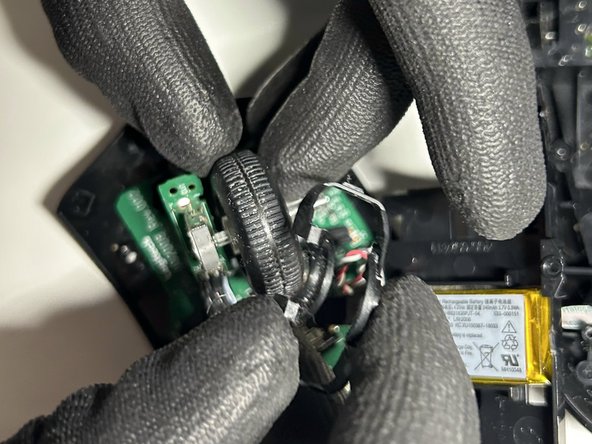
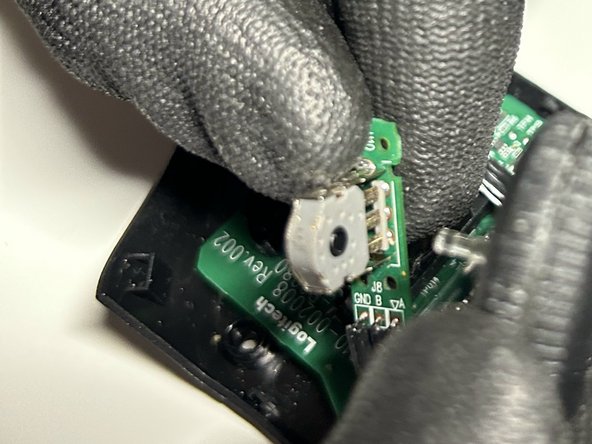
    • Remove the rubber piece protecting the scroll wheel.

    • Detach the scroll wheel from the white plastic piece and replace.

결론

To reassemble your device, follow the above steps in reverse order.
Take your e-waste to an R2 or e-Stewards certified recycler.
Repair didn’t go as planned? Try some basic troubleshooting or ask our Answers community for help.

다른 7명이 해당 안내서를 완성하였습니다.

작성자

1다른 기여자 명과 함께

Nail Ninja Johnson

회원 가입일: 09/18/23

343 평판

안내서 1개를 작성함

York University, Team B-10, Woodhouse Fall 2023 York University, Team B-10, Woodhouse Fall 2023 회원

YORK-WOODHOUSE-F23SBG10

1 회원

안내서 3개를 작성함

1가이드 댓글

¿Hola, cual es la altura del switch de la rueda del mouse?

Lautaro Tello (Ignar) - 답글

댓글 쓰기

조회 통계:

지난 24시간: 15

지난 7일: 93

지난 30일: 411

전체 시간: 8,196