소개
If you are still having problems with your Companion remote after changing the command settings, it may be time to change the remote battery. This guide will help you access and replace your Companion remote battery. There are no tools required for this guide, all you need to do is remove the battery cover and lift the battery.
필요한 것


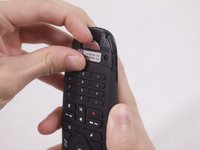
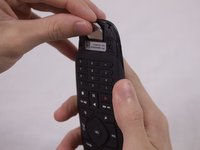
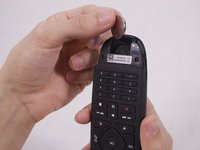
To reassemble your device, follow these instructions in reverse order.
다른 3명이 해당 안내서를 완성하였습니다.



팀

USF Tampa, Team S1-G3, Nance Fall 2017 USF Tampa, Team S1-G3, Nance Fall 2017 회원
USFT-NANCE-F17S1G3
3 회원들
안내서 4개를 작성함
3가이드 댓글
Article fails without mentioning the type of battery the remote uses.
The battery type is CR2032 3v Lithium coin/button cell
Very helpful.
