주요 콘텐츠로 건너뛰기

Logitech UE Boom 3 Passive Radiator Replacement

필요한 것

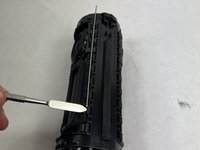
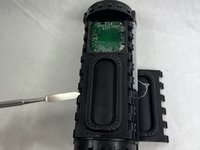
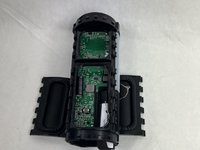
  1. Logitech UE Boom 3 Passive Radiator Replacement, Lid: 1 단계, 이미지 2개 중 1개 Logitech UE Boom 3 Passive Radiator Replacement, Lid: 1 단계, 이미지 2개 중 2개
    • Insert a Jimmy into the space between the body and the lid.

    • Wiggle the Jimmy to loosen the lid. Continue around the lid until lid comes off.

    • This may require a lot of force to open.

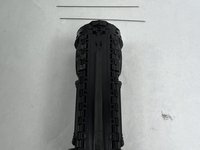
  2. Logitech UE Boom 3 Passive Radiator Replacement, Speaker Driver: 2 단계, 이미지 3개 중 1개 Logitech UE Boom 3 Passive Radiator Replacement, Speaker Driver: 2 단계, 이미지 3개 중 2개 Logitech UE Boom 3 Passive Radiator Replacement, Speaker Driver: 2 단계, 이미지 3개 중 3개
    • Pull or push the body of the speaker out of the casing.

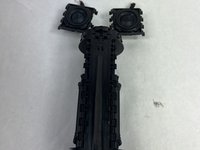
  3. Logitech UE Boom 3 Passive Radiator Replacement: 3 단계, 이미지 3개 중 1개 Logitech UE Boom 3 Passive Radiator Replacement: 3 단계, 이미지 3개 중 2개 Logitech UE Boom 3 Passive Radiator Replacement: 3 단계, 이미지 3개 중 3개
    • Remove the metal bars from the body of the speaker using the spudger.

    • Carefully pull out the speaker driver from the body of the speaker.

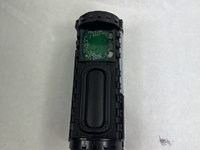
  4. Logitech UE Boom 3 Passive Radiator Replacement, Passive Radiator: 4 단계, 이미지 3개 중 1개 Logitech UE Boom 3 Passive Radiator Replacement, Passive Radiator: 4 단계, 이미지 3개 중 2개 Logitech UE Boom 3 Passive Radiator Replacement, Passive Radiator: 4 단계, 이미지 3개 중 3개
    • Use a spudger to pry open the passive radiators on both sides.

    • Prongs on side of passive radiator are fragile and can snap easily.

결론

To reassemble your device, follow these instructions in reverse order.

작성자

1다른 기여자 명과 함께

Ethan Donahue

회원 가입일: 03/18/24

600 평판

안내서 6개를 작성함

UMass Dartmouth, Team 1-4, Konn Spring 2024 UMass Dartmouth, Team 1-4, Konn Spring 2024 회원

UMASSD-KONN-S24S1G4

4 회원들

안내서 8개를 작성함

0가이드 댓글

댓글 쓰기

조회 통계:

지난 24시간: 2

지난 7일: 8

지난 30일: 19

전체 시간: 238