소개
This guide is for the Logitech UE Boom 3 - model number: S-00171. Alternative model numbers could be S-00171-A, S-00171-B, S-00171-C.
The primary objective of this guide is to provide step-by-step instructions for replacing the USB port of the Logitech UE BOOM 3. By following these instructions carefully, users can address issues such as damaged or malfunctioning USB ports, restoring the device's ability to charge and connect to external devices.
The USB port is a crucial component of the Logitech UE BOOM 3 speaker, serving as the primary interface for charging the device and connecting it to external audio sources. This port facilitates data transfer and power delivery, allowing users to charge their speaker and connect with compatible devices.
필요한 것
-
-
-
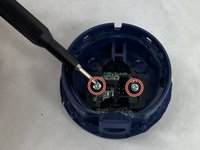
Remove two screws holding the USB port control board in place using a Phillips #00 screwdriver.
-
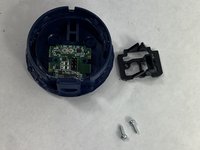
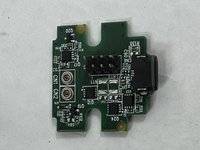
Remove the bracket and USB port control board from the base.
-


To reassemble your device, follow these instructions in reverse order.



팀

UMass Dartmouth, Team 1-4, Konn Spring 2024 UMass Dartmouth, Team 1-4, Konn Spring 2024 회원
UMASSD-KONN-S24S1G4
4 회원들
안내서 8개를 작성함
