주요 콘텐츠로 건너뛰기

MSI GS63VR 6RF Stealth Pro Wi-Fi Card Replacement

필요한 것

  1. MSI GS63VR 6RF Stealth Pro Wi-Fi Card Replacement, Wi-Fi Card: 1 단계, 이미지 3개 중 1개 MSI GS63VR 6RF Stealth Pro Wi-Fi Card Replacement, Wi-Fi Card: 1 단계, 이미지 3개 중 2개 MSI GS63VR 6RF Stealth Pro Wi-Fi Card Replacement, Wi-Fi Card: 1 단계, 이미지 3개 중 3개
    • First, turn off the laptop and make sure it is unplugged from power to avoid injury or damage to your device.

    • Unscrew the 15 screws on the bottom panel of the computer using a Phillips #00 screwdriver. One screw will be hidden under a warranty sticker

    • Gently pry around the back cover off the with a plastic spudger

    • Unplug the battery cable from the motherboard.

    • Too much pressure from the spudger can break the clips that secure the back panel, but some flex is not dangerous.

  2. MSI GS63VR 6RF Stealth Pro Wi-Fi Card Replacement: 2 단계, 이미지 2개 중 1개 MSI GS63VR 6RF Stealth Pro Wi-Fi Card Replacement: 2 단계, 이미지 2개 중 2개
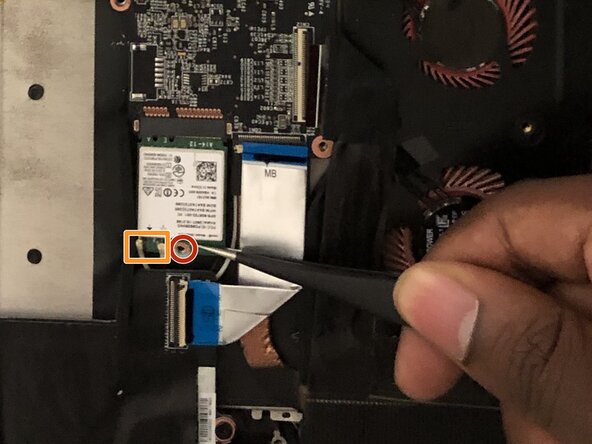
    • Unscrew the single screw from the Wi-Fi card using a Phillips #00 screwdriver.

    • Slide a thin, ESD-safe pry tool or angled tweezers under the metal neck of the connector (as close to the head as possible) and lift straight up from the board.

    • When working with these connectors, it's key to always lift the head straight up. If pried on at an odd angle, you risk breaking the socket off of the board underneath.

    • Reconnecting these can be tricky. Use tweezers to hold the connector in place over its socket and gently press down with your finger or a spudger—the connector should "snap" into place. If you're having trouble, reposition the head and try again.

    • Using tweezers, carefully grab and remove the Wi-Fi card.

결론

To reassemble your device, follow these instructions in reverse order. Take your e-waste to an R2 or e-Stewards certified recycler.

다른 한 분이 해당 안내서를 완성하였습니다.

작성자

11다른 기여자 명과 함께

Nabil Ranjbar

회원 가입일: 09/20/17

276 평판

안내서 2개를 작성함

3가이드 댓글

Is this a msata card or a m.2 card?

keith dragon - 답글

Hi, do you know where I can find some new wifi cables? I broke mine (with my WiFi card) and looking to repair it

Best regards

Bastien Allaoui - 답글

Hi there , the wifi cable (aux) its not connecting to the card , probaly I have bent it , what problem does it cause because right now I still can use the wifi, and most important thing , where can I buy it and how can change it ? Thanks

Adriano - 답글

댓글 쓰기

조회 통계:

지난 24시간: 0

지난 7일: 3

지난 30일: 28

전체 시간: 4,616