주요 콘텐츠로 건너뛰기

Mac mini (2024) CMOS Battery Replacement

필요한 것

  1. Mac mini (2024) CMOS Battery Replacement, Before you begin: 1 단계, 이미지 2개 중 1개 Mac mini (2024) CMOS Battery Replacement, Before you begin: 1 단계, 이미지 2개 중 2개
    • Fully shut down your Mac mini and unplug all cables from it.

    • Flip over your Mac mini and place it on a clean, flat surface to avoid scratching the chassis.

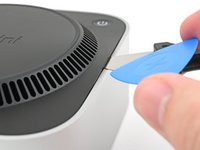
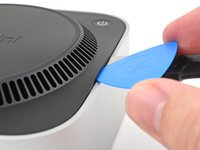
  2. Mac mini (2024) CMOS Battery Replacement, Create a gap: 2 단계, 이미지 3개 중 1개 Mac mini (2024) CMOS Battery Replacement, Create a gap: 2 단계, 이미지 3개 중 2개 Mac mini (2024) CMOS Battery Replacement, Create a gap: 2 단계, 이미지 3개 중 3개
    • Using the Jimmy or other metal tools during this step could scratch the aluminum chassis; however, it's the simplest way to perform this step. Follow the alternate instructions to avoid scratching the aluminum.

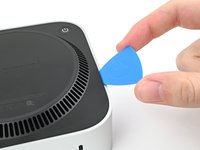
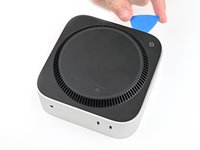
    • Insert a Jimmy into the gap between the bottom cover and the chassis.

    • Pry up the bottom cover to create a gap.

    • Alternatively, you can insert the point of a spudger into one of the plastic vent holes and pry up to create a gap big enough to insert an opening pick into.

    • Keep the Jimmy inserted under the bottom cover.

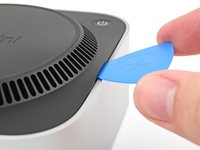
  3. Mac mini (2024) CMOS Battery Replacement, Insert an opening pick: 3 단계, 이미지 3개 중 1개 Mac mini (2024) CMOS Battery Replacement, Insert an opening pick: 3 단계, 이미지 3개 중 2개 Mac mini (2024) CMOS Battery Replacement, Insert an opening pick: 3 단계, 이미지 3개 중 3개
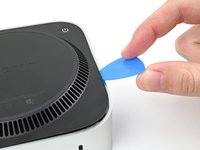
    • Insert an opening pick into the gap created by the Jimmy.

    • Remove the Jimmy.

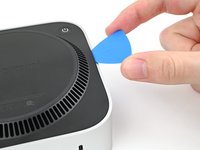
  4. Mac mini (2024) CMOS Battery Replacement, Release the pins: 4 단계, 이미지 3개 중 1개 Mac mini (2024) CMOS Battery Replacement, Release the pins: 4 단계, 이미지 3개 중 2개 Mac mini (2024) CMOS Battery Replacement, Release the pins: 4 단계, 이미지 3개 중 3개
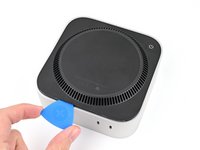
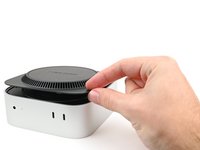
    • Slide the opening pick along the bottom cover until you feel it snag on a pin.

    • There are four pins total—one at each corner of the bottom cover.

    • Twist the pick to lift the pin out of its slot.

  5. Mac mini (2024) CMOS Battery Replacement: 5 단계, 이미지 3개 중 1개 Mac mini (2024) CMOS Battery Replacement: 5 단계, 이미지 3개 중 2개 Mac mini (2024) CMOS Battery Replacement: 5 단계, 이미지 3개 중 3개
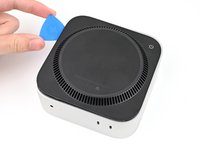
    • Continue sliding and prying with the pick along the perimeter of the bottom cover to release the remaining pins.

    • Don't insert the pick more than an inch when sliding near the power button, as you risk damaging the cable.

    • During reassembly, press along the perimeter of the bottom until you hear and feel all four pins click back into place.

  6. Mac mini (2024) CMOS Battery Replacement: 6 단계, 이미지 2개 중 1개 Mac mini (2024) CMOS Battery Replacement: 6 단계, 이미지 2개 중 2개
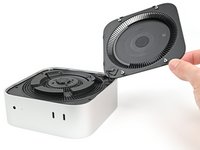
    • Don't remove the bottom cover, as it's still connected to the Mac mini with a cable.

    • Lift the edge of the bottom cover opposite the power button and flip it over to expose the power button cable.

  7. Mac mini (2024) CMOS Battery Replacement, Disconnect the power button: 7 단계, 이미지 2개 중 1개 Mac mini (2024) CMOS Battery Replacement, Disconnect the power button: 7 단계, 이미지 2개 중 2개
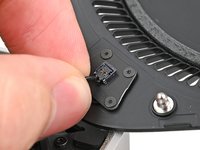
    • The power button cable is very fragile! You don't have to disconnect it to access the internals— but it will require you to keep the bottom cover propped up.

    • To disconnect the cable and remove the bottom cover, follow the next two steps.

    • If you don't disconnect the cable, prop up the bottom cover to prevent straining the cable and skip the next two steps.

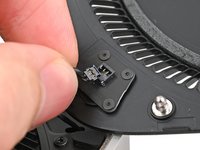
    • Grip the power button cable close to the head and pull it away from its socket to disconnect it.

  8. Mac mini (2024) CMOS Battery Replacement, Remove the bottom cover: 8 단계, 이미지 1개 중 1개
    • Remove the bottom cover.

  9. Mac mini (2024) CMOS Battery Replacement, Remove the CMOS battery screws: 9 단계, 이미지 2개 중 1개 Mac mini (2024) CMOS Battery Replacement, Remove the CMOS battery screws: 9 단계, 이미지 2개 중 2개
    이 단계에 사용된 도구:
    FixMat
    $31.41
    • Throughout this repair, keep track of each screw and make sure it goes back exactly where it came from.

    • While the Mac mini uses Torx Plus screws, standard Torx bits work. Make sure to apply constant, downward force to prevent stripping.

    • Use a Torx Plus 3IP screwdriver to remove the two 2.1 mm‑long screws securing the CMOS battery screws.

  10. Mac mini (2024) CMOS Battery Replacement, Remove the CMOS battery: 10 단계, 이미지 2개 중 1개 Mac mini (2024) CMOS Battery Replacement, Remove the CMOS battery: 10 단계, 이미지 2개 중 2개
    • Lift the CMOS battery and its housing off the inner plate and remove it.

  11. Mac mini (2024) CMOS Battery Replacement, Separate the CMOS battery: 11 단계, 이미지 3개 중 1개 Mac mini (2024) CMOS Battery Replacement, Separate the CMOS battery: 11 단계, 이미지 3개 중 2개 Mac mini (2024) CMOS Battery Replacement, Separate the CMOS battery: 11 단계, 이미지 3개 중 3개
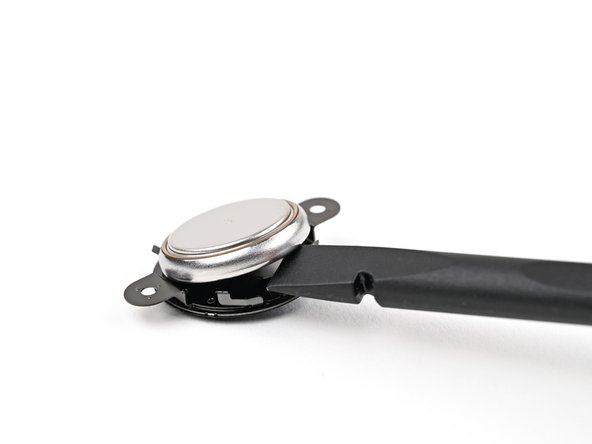
    • Use the flat end of a spudger, or your fingernail, to lift the CMOS battery out of its housing.

    • During reassembly, place the flat, shinier side of the battery into the section of the housing with the plus sign.

결론

To reassemble your device, follow these instructions in reverse order.

Take your e-waste to an R2 or e-Stewards certified recycler.

Repair didn’t go as planned? Try some basic troubleshooting, or ask our Mac mini (2024) Answers Community for help.

작성자

1다른 기여자 명과 함께

Alex Diaz-Kokaisl

회원 가입일: 01/16/22

212,843 평판

안내서 1,039개를 작성함

iFixit iFixit 회원

Staff

123 회원들

안내서 23,618개를 작성함

0가이드 댓글

댓글 쓰기

조회 통계:

지난 24시간: 11

지난 7일: 78

지난 30일: 427

전체 시간: 3,385