주요 콘텐츠로 건너뛰기
수리 커뮤니티 가입 - 계정 만들기

MacBook Air 11" Late 2010 AirPort/Bluetooth Card Replacement

필요한 것

    1. MacBook Air 11" Late 2010 AirPort/Bluetooth Card Replacement, Lower Case: 1 단계, 이미지 1개 중 1개
      이 단계에 사용된 도구:
      P5 Pentalobe Screwdriver Retina MacBook Pro and Air
      $5.99
      • Before proceeding, close your computer and lay it on a soft surface top-side down.

      • Remove the following ten screws:

      • Two 8 mm 5-point Pentalobe screws

      • Eight 2.5 mm 5-point Pentalobe screws

      • The special screwdriver needed to remove the eight 5-point Pentalobe screws can be found here.

      댓글 쓰기

    2. MacBook Air 11" Late 2010 AirPort/Bluetooth Card Replacement: 2 단계, 이미지 1개 중 1개
      • Wedge your fingers between the display and the lower case and pull upward to pop the lower case off the Air.

      • Remove the lower case and set it aside.

      댓글 쓰기

    1. MacBook Air 11" Late 2010 AirPort/Bluetooth Card Replacement, Battery: 3 단계, 이미지 2개 중 1개 MacBook Air 11" Late 2010 AirPort/Bluetooth Card Replacement, Battery: 3 단계, 이미지 2개 중 2개
      • In this step you will disconnect the battery to help avoid shorting out any components during service.

      • Use the flat end of a spudger to pry both short sides of the battery connector upward to disconnect it from its socket on the logic board.

      • Bend the battery cable slightly away from the logic board so the connector will not accidentally contact its socket.

      댓글 쓰기

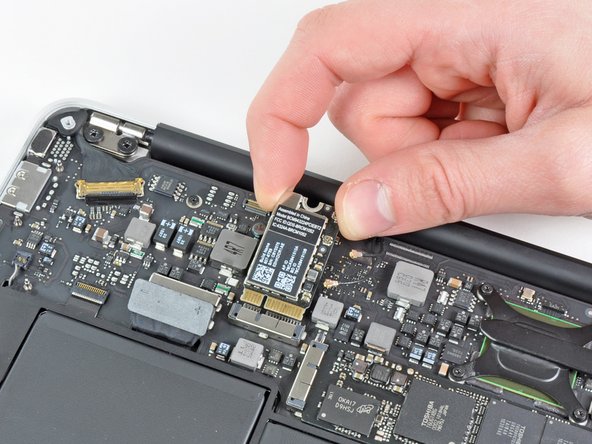
    1. MacBook Air 11" Late 2010 AirPort/Bluetooth Card Replacement, AirPort/Bluetooth Card: 4 단계, 이미지 2개 중 1개 MacBook Air 11" Late 2010 AirPort/Bluetooth Card Replacement, AirPort/Bluetooth Card: 4 단계, 이미지 2개 중 2개
      • Use the flat end of a spudger to pry both antenna connectors up from their sockets on the AirPort/Bluetooth card.

      댓글 쓰기

    2. MacBook Air 11" Late 2010 AirPort/Bluetooth Card Replacement: 5 단계, 이미지 1개 중 1개
      • Remove the single 2.9 mm T5 Torx screw securing the AirPort/Bluetooth card to the logic board.

      댓글 쓰기

    3. MacBook Air 11" Late 2010 AirPort/Bluetooth Card Replacement: 6 단계, 이미지 2개 중 1개 MacBook Air 11" Late 2010 AirPort/Bluetooth Card Replacement: 6 단계, 이미지 2개 중 2개
      • Slightly lift the free end of the AirPort/Bluetooth board and pull it out of its socket on the logic board.

      • Remove the AirPort/Bluetooth board from the Air.

      댓글 쓰기

결론

To reassemble your device, follow these instructions in reverse order.

취소: 해당 안내서를 완성하지 않았습니다.

다른 13명이 해당 안내서를 완성하였습니다.

1가이드 댓글

Hi Andrew, thanks for your guide on MacBook Air 11" Late 2010 Airport-Bluetooth Card. I am desperately trying to purchase new cables with female connectors to connect to the Card's male jacks. I ignore the size which is important: I tried MHF 4 too small, MHF 1 too big, so before buying wrong cables again I wonder if you can tell me what size is the Card's jack connection. I thank you for your help in advance.

Max

Massimo Bazzano - 답글 공유

댓글 쓰기

조회 통계:

지난 24시간: 0

지난 7일: 15

지난 30일: 64

전체 시간: 24,448