주요 콘텐츠로 건너뛰기

Minolta QTsi Maxxum Shutter Button Replacement

필요한 것

  1. Minolta QTsi Maxxum Shutter Button Replacement, Shutter Button: 1 단계, 이미지 1개 중 1개
    • Locate the battery compartment on the bottom panel of the camera.

    • Open the battery door by using a coin.

    • In the counterclockwise direction, twist the coin in the battery door groove to open it.

  2. Minolta QTsi Maxxum Shutter Button Replacement: 2 단계, 이미지 1개 중 1개
    • Two batteries are located inside the battery chamber.

    • Remove the two batteries from the battery chamber by picking them up.

  3. Minolta QTsi Maxxum Shutter Button Replacement: 3 단계, 이미지 1개 중 1개
    • There is a screw located underneath the batteries in the battery compartment.

    • Unscrew and remove the (1) black Phillips #00 5mm screw from the battery compartment.

    • Ensure good lighting before attempting to remove this screw because it is hard to see inside the compartment.

  4. Minolta QTsi Maxxum Shutter Button Replacement: 4 단계, 이미지 1개 중 1개
    • From underneath the flash assembly, remove the (1) black Phillips #00 5mm screw

    • Be careful because you can lose the screw

  5. Minolta QTsi Maxxum Shutter Button Replacement: 5 단계, 이미지 1개 중 1개
    • The only screws remaining that hold the top panel of the camera in place are located next to the view finder.

    • Remove the (2) black Phillips #00 5mm screws from both sides of the view finder.

    • Be careful because you can lose the screw

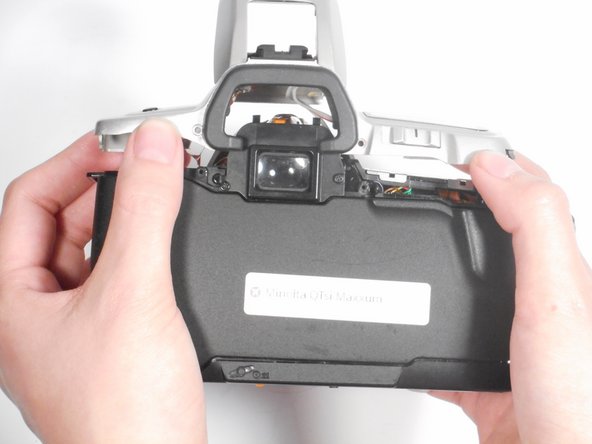
  6. Minolta QTsi Maxxum Shutter Button Replacement: 6 단계, 이미지 2개 중 1개 Minolta QTsi Maxxum Shutter Button Replacement: 6 단계, 이미지 2개 중 2개
    • The top panel of the camera should now be easy to lift off. If it is not, make sure that all screws and attachments, listed in steps 1-5, have been removed.

    • Once all screws are removed, lift the top panel from the camera.

    • Be careful when removing the top panel because there are wires connected to it.

  7. Minolta QTsi Maxxum Shutter Button Replacement: 7 단계, 이미지 1개 중 1개
    • Use a metal spudger to push the button out of its socket so that you can place a new one in its place.

결론

To reassemble your device, follow these instructions in reverse order.

다른 한 분이 해당 안내서를 완성하였습니다.

작성자

4다른 기여자 명과 함께

Jordan Ellery

회원 가입일: 10/10/16

388 평판

안내서 3개를 작성함

Sam Houston State, Team 12-4, Blackburne Fall 2016 Sam Houston State, Team 12-4, Blackburne Fall 2016 회원

SHSU-BLACKBURNE-F16S12G4

4 회원들

안내서 5개를 작성함

0가이드 댓글

댓글 쓰기

조회 통계:

지난 24시간: 0

지난 7일: 1

지난 30일: 6

전체 시간: 673