주요 콘텐츠로 건너뛰기

Motorola Edge (2022) Camera Bezel Replacement

필요한 것

  1. Motorola Edge (2022) Camera Bezel Replacement, Heat the right edge: 1 단계, 이미지 1개 중 1개
    • Heat an iOpener and apply it to the back cover's right edge for two minutes.

    • A hair dryer, heat gun, or hot plate may also be used, but be careful not to overheat the phone—the display and internal battery are both susceptible to heat damage.

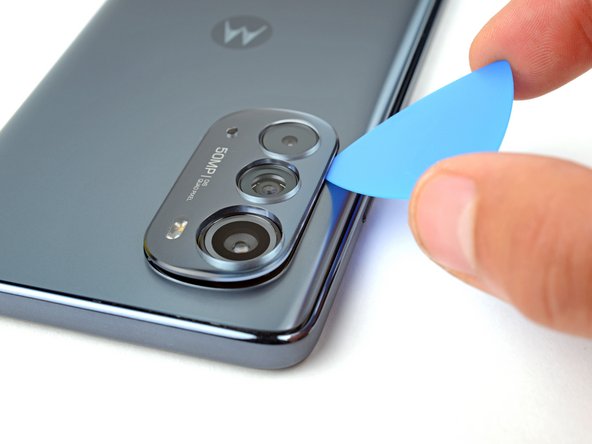
  2. Motorola Edge (2022) Camera Bezel Replacement, Insert an opening pick: 2 단계, 이미지 2개 중 1개 Motorola Edge (2022) Camera Bezel Replacement, Insert an opening pick: 2 단계, 이미지 2개 중 2개
    • Insert an opening pick between the camera bezel and the back cover.

  3. Motorola Edge (2022) Camera Bezel Replacement, Slice the camera bezel adhesive: 3 단계, 이미지 2개 중 1개 Motorola Edge (2022) Camera Bezel Replacement, Slice the camera bezel adhesive: 3 단계, 이미지 2개 중 2개
    • Slide the pick around the perimeter of the camera bezel to slice all the adhesive securing the bezel.

    • You may have to repeat this process multiple times to completely cut all of the adhesive.

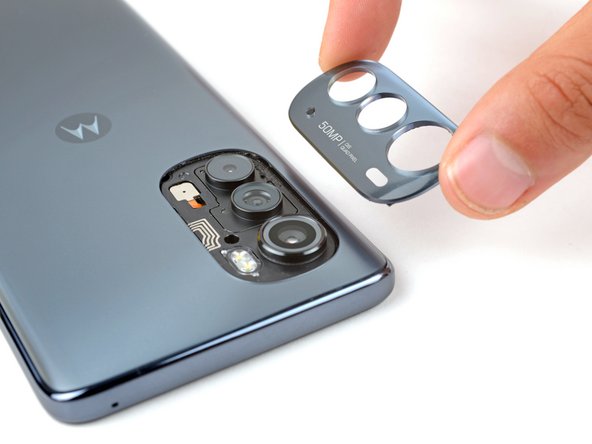
  4. Motorola Edge (2022) Camera Bezel Replacement, Remove the camera bezel: 4 단계, 이미지 2개 중 1개 Motorola Edge (2022) Camera Bezel Replacement, Remove the camera bezel: 4 단계, 이미지 2개 중 2개
    • Lift the camera bezel away from the phone and remove it.

결론

To reassemble your device, follow the instructions in reverse order.

Take your e-waste to an R2 or e-Stewards certified recycler.

Repair didn’t go as planned? Check out our Answers community for troubleshooting help.

작성자

4다른 기여자 명과 함께

Spencer Day

회원 가입일: 09/14/22

155,120 평판

안내서 1,033개를 작성함

iFixit iFixit 회원

Staff

123 회원들

안내서 23,788개를 작성함

0가이드 댓글

댓글 쓰기

조회 통계:

지난 24시간: 0

지난 7일: 2

지난 30일: 8

전체 시간: 569