주요 콘텐츠로 건너뛰기

Motorola i850 SIM Card Replacement

  1. Motorola i850 SIM Card Replacement, Disassembling Motorola i850 Back Cover: 1 단계, 이미지 1개 중 1개
    • Use your thumb to slide the back cover locker away from the antenna.

  2. Motorola i850 SIM Card Replacement: 2 단계, 이미지 2개 중 1개 Motorola i850 SIM Card Replacement: 2 단계, 이미지 2개 중 2개
    • Slide the back cover towards the antenna while lifting the cover away from the phone.

  3. Motorola i850 SIM Card Replacement, Battery: 3 단계, 이미지 1개 중 1개
    • Place your thumb on the indicated corner while stabilizing the phone and the upper portion of the battery with your forefinger.

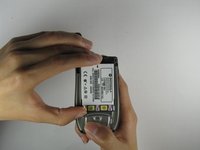
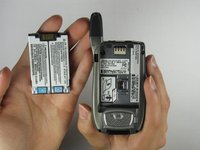
  4. Motorola i850 SIM Card Replacement: 4 단계, 이미지 2개 중 1개 Motorola i850 SIM Card Replacement: 4 단계, 이미지 2개 중 2개
    • Lift the battery out of the phone while pushing it towards the antenna.

  5. Motorola i850 SIM Card Replacement, SIM Card: 5 단계, 이미지 1개 중 1개
    • Place thumb on SIM Card door latch.

  6. Motorola i850 SIM Card Replacement: 6 단계, 이미지 1개 중 1개
    • Slide the SIM Card door latch away from the SIM Card. The door should pop open. If it does not pop open, use a fingernail to open it.

  7. Motorola i850 SIM Card Replacement: 7 단계, 이미지 1개 중 1개
    • Lift the SIM Card with your thumb and forefinger to complete the removal of the SIM card!

결론

To reassemble your device, follow these instructions in reverse order.

작성자

2다른 기여자 명과 함께

Alex Jones

회원 가입일: 04/09/10

1 평판

안내서 3개를 작성함

Cal Poly, Team 34-56, Forte Spring 2010 Cal Poly, Team 34-56, Forte Spring 2010 회원

CPSU-FORTE-S10S34G56

4 회원들

안내서 10개를 작성함

0가이드 댓글

댓글 쓰기

조회 통계:

지난 24시간: 0

지난 7일: 2

지난 30일: 6

전체 시간: 4,738