주요 콘텐츠로 건너뛰기

Nikon Coolpix P100 Viewfinder Replacement

필요한 것

  1. Nikon Coolpix P100 Viewfinder Replacement, Nikon Coolpix P100  Motherboard Access: 1 단계, 이미지 1개 중 1개
    • Turn the front of the camera toward you.

  2. Nikon Coolpix P100 Viewfinder Replacement: 2 단계, 이미지 3개 중 1개 Nikon Coolpix P100 Viewfinder Replacement: 2 단계, 이미지 3개 중 2개 Nikon Coolpix P100 Viewfinder Replacement: 2 단계, 이미지 3개 중 3개
    • On the left side of the camera, use a Phillips #00 Precision Screwdriver to remove the two marked screws.

  3. Nikon Coolpix P100 Viewfinder Replacement: 3 단계, 이미지 1개 중 1개
    • On the right side of the camera, remove the first visible screw above the HDMI and A/V OUT cover.

  4. Nikon Coolpix P100 Viewfinder Replacement: 4 단계, 이미지 1개 중 1개
    • Lift the HDMI and A/V OUT cover to access the hidden screw between the two ports.

    • Remove the screw

  5. Nikon Coolpix P100 Viewfinder Replacement: 5 단계, 이미지 1개 중 1개
    • Flip the camera upside down and remove the seven marked screws.

  6. Nikon Coolpix P100 Viewfinder Replacement: 6 단계, 이미지 2개 중 1개 Nikon Coolpix P100 Viewfinder Replacement: 6 단계, 이미지 2개 중 2개
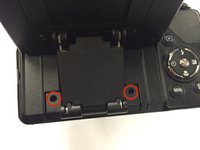
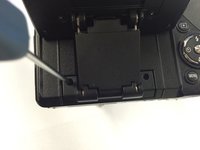
    • Turn the back of the camera toward you.

    • Lift the display panel and remove the two marked screws

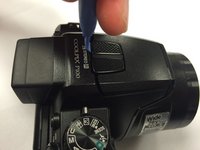
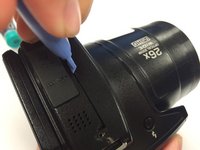
  7. Nikon Coolpix P100 Viewfinder Replacement: 7 단계, 이미지 3개 중 1개 Nikon Coolpix P100 Viewfinder Replacement: 7 단계, 이미지 3개 중 2개 Nikon Coolpix P100 Viewfinder Replacement: 7 단계, 이미지 3개 중 3개
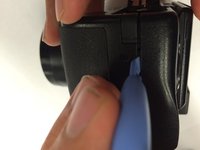
    • Use a plastic iFixit opening tool to gently loosen the top and sides of the camera.

  8. Nikon Coolpix P100 Viewfinder Replacement: 8 단계, 이미지 1개 중 1개
    • Before fully opening the camera, identify the two marked ribbon cables

    • Properly detach the ribbons before proceeding

  9. Nikon Coolpix P100 Viewfinder Replacement: 9 단계, 이미지 1개 중 1개
    • Carefully open the camera.

    • Now you have partial access to the camera's motherboard.

  10. Nikon Coolpix P100 Viewfinder Replacement: 10 단계, 이미지 1개 중 1개
    • Remove the five indicated screws that are attached to the metal plate.

  11. Nikon Coolpix P100 Viewfinder Replacement: 11 단계, 이미지 1개 중 1개
    • Remove the hidden top screw that is attached to the metal plate.

  12. Nikon Coolpix P100 Viewfinder Replacement: 12 단계, 이미지 1개 중 1개
    • Use a plastic iFixit opening tool to carefully loosen the metal plate.

    • Remove the metal plate to access the camera's motherboard.

  13. Nikon Coolpix P100 Viewfinder Replacement: 13 단계, 이미지 1개 중 1개
    • Now you have access to the camera's motherboard

  14. Nikon Coolpix P100 Viewfinder Replacement, Viewfinder: 14 단계, 이미지 1개 중 1개
    • Remove the screw that is located on the left of the view finder.

  15. Nikon Coolpix P100 Viewfinder Replacement: 15 단계, 이미지 1개 중 1개
    • Carefully detach the two ribbon cables and detach the viewfinder.

결론

To reassemble your device, follow these instructions in reverse order.

다른 3명이 해당 안내서를 완성하였습니다.

작성자

1다른 기여자 명과 함께

Nghiem Ngo

회원 가입일: 01/15/15

339 평판

안내서 2개를 작성함

USF Tampa, Team 1-1, Tanski Winter 2015 USF Tampa, Team 1-1, Tanski Winter 2015 회원

USFT-TANSKI-W15S1G1

3 회원들

안내서 8개를 작성함

0가이드 댓글

댓글 쓰기

조회 통계:

지난 24시간: 1

지난 7일: 3

지난 30일: 13

전체 시간: 1,304