주요 콘텐츠로 건너뛰기

Nikon D7100 LCD Screen Replacement

필요한 것

  1. Nikon D7100 LCD Screen Replacement, LCD Screen: 1 단계, 이미지 1개 중 1개
    • When loosening the screws, start pressing the screwdriver firmly for the first 1-2 turns (highest torque) until the screw is 'unlocked'. Failing to do so can damage the screw head and make it impossible to disengage that screw.

    • Remove the five screws on the bottom of the camera with a JIS #000 head screwdriver.

  2. Nikon D7100 LCD Screen Replacement: 2 단계, 이미지 1개 중 1개
    • Remove the 3 screws under the battery flap and remove the bottom cover.

  3. Nikon D7100 LCD Screen Replacement: 3 단계, 이미지 1개 중 1개
    • Remove the 2 screws inside the camera on the back corners.

  4. Nikon D7100 LCD Screen Replacement: 4 단계, 이미지 1개 중 1개
    • Open the HDMI flap and remove the 2 screws.

  5. Nikon D7100 LCD Screen Replacement: 5 단계, 이미지 1개 중 1개
    • Remove the screw next to the camera strap loop.

  6. Nikon D7100 LCD Screen Replacement: 6 단계, 이미지 1개 중 1개
    • Remove the 2 screws on each side of the view finder.

  7. Nikon D7100 LCD Screen Replacement: 7 단계, 이미지 1개 중 1개
    • Remove the 2 screws above and below the SD card flap.

  8. Nikon D7100 LCD Screen Replacement: 8 단계, 이미지 1개 중 1개
    • Peel off the adhesive leather screw cover and remove the 2 screws under it.

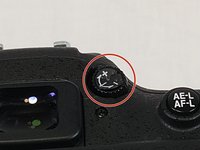
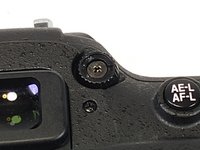
  9. Nikon D7100 LCD Screen Replacement: 9 단계, 이미지 2개 중 1개 Nikon D7100 LCD Screen Replacement: 9 단계, 이미지 2개 중 2개
    • Remove the Diopter adjustment control sticker and remove the screw under it.

  10. Nikon D7100 LCD Screen Replacement: 10 단계, 이미지 1개 중 1개
    • Separate the back panel of the camera from the actual camera.

    • Be careful not to tear any of the ribbon cables.

  11. Nikon D7100 LCD Screen Replacement: 11 단계, 이미지 1개 중 1개
    • Disconnect the LCD ribbon cables and power cable from the motherboard.

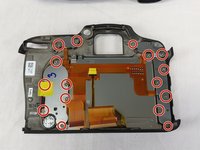
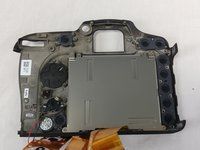
  12. Nikon D7100 LCD Screen Replacement: 12 단계, 이미지 2개 중 1개 Nikon D7100 LCD Screen Replacement: 12 단계, 이미지 2개 중 2개
    • Unscrew all 16 screws around the back plate of the camera.

  13. Nikon D7100 LCD Screen Replacement: 13 단계, 이미지 1개 중 1개
    • Then unscrew the remaining screws holding the back plate to the LCD.

    • Then simply remove the plate with the LCD.

결론

To reassemble your device, follow these instructions in reverse order.

다른 12명이 해당 안내서를 완성하였습니다.

작성자

5다른 기여자 명과 함께

Wesley Eveld

회원 가입일: 02/20/18

754 평판

안내서 4개를 작성함

USF Tampa, Team S11-G6, Cheng Spring 2018 USF Tampa, Team S11-G6, Cheng Spring 2018 회원

USFT-CHENG-S18S11G6

4 회원들

안내서 6개를 작성함

9가이드 댓글

I DID IT! A couple notes: 1) You don’t need to disconnect the ribbon cables from the body. I’m new to fine electronics repair like this and I didn’t want to mess around with more cables than necessary. 2) My body doesn’t have a plastic cover over the LCD (probably why it broke…) and as such I had to reallllly pry it off. 3) Learn how to reconnect ribbon cables - I had no idea.

Patrick O'Hare - 답글

Are all screws the same size ?

trevee359 - 답글

A couple of points. This is listed as a LCD display replacement. Says only said to buy tools… Need the LCD screen as well. No idea of cost or a link to buy same. Also, you do not show removing the screen and remounting. I appreciate all the instructions on screws, but do not feel this was complete. Thanks for your instructions to this point.

Carl Bryant II - 답글

That’s very easy guide to understand. I hope to see a full guide for the Nikon D7200. thank you http://www.nikonbundle.com/nikon-d7200-b...

Deve Marko - 답글

My replacement screen cost about £44 gbp pounds from China on Ebay. The main ribbon cable is released by flipping up the thin dark grey strip opposite the ribbon using a finger nail or plastic tool on the socket then you just gently pull the cable out, the thin cable is wee bit different, using a small screw driver or dentist tool just unclip and pull/push it down towards the thin ribbon cable then slide ribbon out. When all done clean the screen on the camera and fit a thin glass protector from JJC on ebay to give more protection.

a.brown.1 - 답글

댓글 쓰기

조회 통계:

지난 24시간: 4

지난 7일: 31

지난 30일: 153

전체 시간: 9,486