주요 콘텐츠로 건너뛰기

Nintendo 3DS Stylus Housing Replacement

필요한 것

  1. Nintendo 3DS Stylus Housing Replacement, Loosen the rear screws: 1 단계, 이미지 1개 중 1개
    이 단계에 사용된 도구:
    Phillips #00 Screwdriver
    $5.49
    • Use a Phillips PH00 screwdriver to loosen the four screws along the top of the back cover.

    • All screws in this device are JIS screws. Official iFixit PH000-PH1 Phillips screwdrivers are designed to be compatible with JIS screws, so they are safe to use. Using a screwdriver other than an official iFixit screwdriver or a JIS screwdriver may result in stripped screws.

    • The screws are held in place by locking washers, and will not come out of the back cover.

  2. Nintendo 3DS Stylus Housing Replacement, Remove the rear cover: 2 단계, 이미지 2개 중 1개 Nintendo 3DS Stylus Housing Replacement, Remove the rear cover: 2 단계, 이미지 2개 중 2개
    • Hold the device in one hand and turn it over.

    • Grab the top edge of the back cover with your opposite hand so that the cover does not fall back into place.

    • Flip the 3DS over again so that the back cover is facing up.

    • Pull the back cover up and away from the rest of the device to remove it.

  3. Nintendo 3DS Stylus Housing Replacement, Battery: 3 단계, 이미지 3개 중 1개 Nintendo 3DS Stylus Housing Replacement, Battery: 3 단계, 이미지 3개 중 2개 Nintendo 3DS Stylus Housing Replacement, Battery: 3 단계, 이미지 3개 중 3개
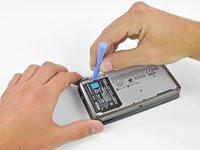
    • Insert a plastic opening tool into the notch in the lower case above the battery.

    • Pry the battery up with the plastic opening tool.

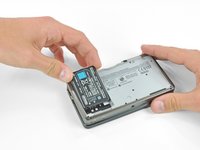
    • Grab the top edge of the battery and lift it out of the lower case.

  4. Nintendo 3DS Stylus Housing Replacement, Lower Case: 4 단계, 이미지 1개 중 1개
    • Use a JIS #00 screwdriver to remove the nine 6.3 mm black screws from the lower case.

    • JIS (Japanese Industrial Standards) screws are not the same as Phillips. To avoid stripping these screws, make sure you are using a JIS #00 screwdriver and not a PHILLIPS #00 screwdriver. You can use a PHILLIPS #00 with a lot of downwards force but be warned this will deform the screw head and you risk stripping it.

    • iFixit's Phillips head screwdriver is desinged to reduce damage on JIS head screws so it should be fine to use, still apply more force. Make sure it's iFixit's official Phillips screwdriver as we are unaware of any other manufacturer who does this.

    • Use a JIS #00 screwdriver to remove the 2.4 mm silver screw above the game cartridge slot.

  5. Nintendo 3DS Stylus Housing Replacement: 5 단계, 이미지 3개 중 1개 Nintendo 3DS Stylus Housing Replacement: 5 단계, 이미지 3개 중 2개 Nintendo 3DS Stylus Housing Replacement: 5 단계, 이미지 3개 중 3개
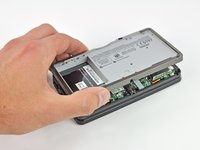
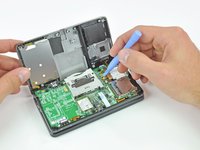
    • Lift the bottom edge of the lower case off the rest of the 3DS.

    • There are still two ribbon cables connecting the mother board to the case, so be sure not to pull the lower case all the way off.

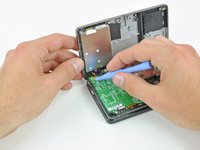
    • Use a plastic opening tool to pry the shoulder button ribbon cables off their sockets on the motherboard.

    • Remove the lower case from the device.

  6. Nintendo 3DS Stylus Housing Replacement, Stylus Housing: 6 단계, 이미지 1개 중 1개
    • Remove the stylus from the lower case.

  7. Nintendo 3DS Stylus Housing Replacement: 7 단계, 이미지 3개 중 1개 Nintendo 3DS Stylus Housing Replacement: 7 단계, 이미지 3개 중 2개 Nintendo 3DS Stylus Housing Replacement: 7 단계, 이미지 3개 중 3개
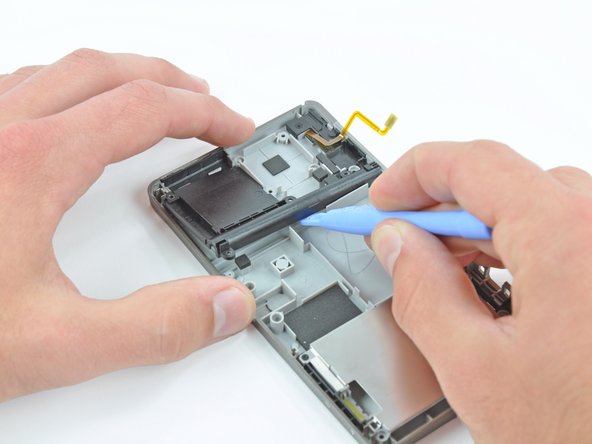
    • Remove the four 2.4 mm Phillips screws that secure the stylus housing to the lower case.

    • Use a plastic opening tool to pry the stylus housing up from the lower case.

    • Grab the stylus housing and remove it from the lower case.

결론

To reassemble your device, follow these instructions in reverse order.

다른 한 분이 해당 안내서를 완성하였습니다.

작성자

5다른 기여자 명과 함께

David Hodson

회원 가입일: 04/13/10

154,622 평판

안내서 127개를 작성함

0가이드 댓글

댓글 쓰기

조회 통계:

지난 24시간: 4

지난 7일: 11

지난 30일: 66

전체 시간: 8,229