주요 콘텐츠로 건너뛰기

Nintendo Wii Remote Shell Replacement

필요한 것

  1. Nintendo Wii Remote Shell Replacement, Removing the strap (Optional, but recommended.): 1 단계, 이미지 1개 중 1개
    • Remove the Safety strap to prevent it into getting in our way

  2. Nintendo Wii Remote Shell Replacement, Removing the batteries: 2 단계, 이미지 2개 중 1개 Nintendo Wii Remote Shell Replacement, Removing the batteries: 2 단계, 이미지 2개 중 2개
    • Remove the battery using a fingernail.

  3. Nintendo Wii Remote Shell Replacement, Removing the screws: 3 단계, 이미지 2개 중 1개 Nintendo Wii Remote Shell Replacement, Removing the screws: 3 단계, 이미지 2개 중 2개
    • This is where the disassembly begins, Grab your Y1 Screwdriver and unscrew the following screws

    • Gently take out the front cover

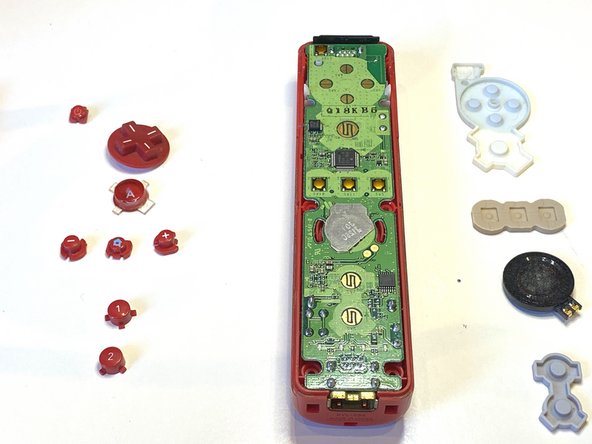
  4. Nintendo Wii Remote Shell Replacement, Removing the buttons: 5 단계, 이미지 2개 중 1개 Nintendo Wii Remote Shell Replacement, Removing the buttons: 5 단계, 이미지 2개 중 2개
    • Remove all of the buttons on the motherboard

  5. Nintendo Wii Remote Shell Replacement, Removing Rubber: 6 단계, 이미지 2개 중 1개 Nintendo Wii Remote Shell Replacement, Removing Rubber: 6 단계, 이미지 2개 중 2개
    • Remove all of the rubber.

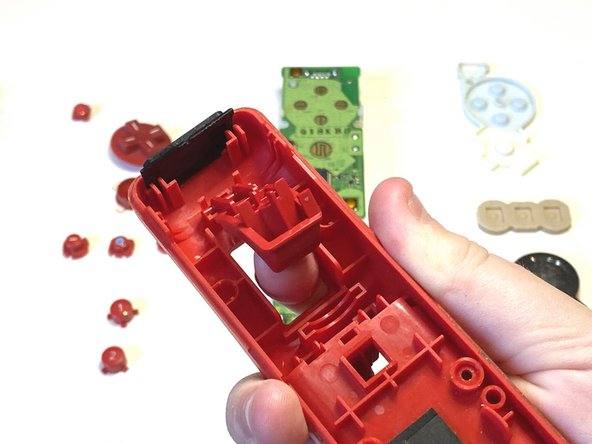
  6. Nintendo Wii Remote Shell Replacement, Removing the Motherboard: 7 단계, 이미지 3개 중 1개 Nintendo Wii Remote Shell Replacement, Removing the Motherboard: 7 단계, 이미지 3개 중 2개 Nintendo Wii Remote Shell Replacement, Removing the Motherboard: 7 단계, 이미지 3개 중 3개
    • Take out the motherboard

  7. Nintendo Wii Remote Shell Replacement, Taking out the B Button: 8 단계, 이미지 3개 중 1개 Nintendo Wii Remote Shell Replacement, Taking out the B Button: 8 단계, 이미지 3개 중 2개 Nintendo Wii Remote Shell Replacement, Taking out the B Button: 8 단계, 이미지 3개 중 3개
    • Take out the B button

  8. Nintendo Wii Remote Shell Replacement, Removing the B Button: 9 단계, 이미지 2개 중 1개 Nintendo Wii Remote Shell Replacement, Removing the B Button: 9 단계, 이미지 2개 중 2개
    • Remove the B Button

  9. Nintendo Wii Remote Shell Replacement, Getting new shell: 10 단계, 이미지 1개 중 1개
    • Grab your new shell

  10. Nintendo Wii Remote Shell Replacement, Inserting the components: 11 단계, 이미지 2개 중 1개 Nintendo Wii Remote Shell Replacement, Inserting the components: 11 단계, 이미지 2개 중 2개
    • Insert all of the buttons

    • Make sure they fit in properly and are clickable.

  11. Nintendo Wii Remote Shell Replacement, Inserting Rubber: 12 단계, 이미지 2개 중 1개 Nintendo Wii Remote Shell Replacement, Inserting Rubber: 12 단계, 이미지 2개 중 2개
    • Put on all of the rubber on the buttons

    • Connect the B button

    • Carfully place the back cover on your wii remote

  12. Nintendo Wii Remote Shell Replacement, Screwing In: 15 단계, 이미지 1개 중 1개
    • Screw in the Y1 Screws into the following places

결론

Thats it!

다른 5명이 해당 안내서를 완성하였습니다.

작성자

1다른 기여자 명과 함께

Artem Ivat

회원 가입일: 02/05/20

3,549 평판

안내서 13개를 작성함

Kid fixers Kid fixers 회원

Community

203 회원들

안내서 288개를 작성함

0가이드 댓글

댓글 쓰기

조회 통계:

지난 24시간: 4

지난 7일: 37

지난 30일: 123

전체 시간: 5,213