주요 콘텐츠로 건너뛰기

Nintendo Wii U GamePad Analog Stick Replacement

필요한 것

  1. Nintendo Wii U GamePad Analog Stick Replacement, Battery: 1 단계, 이미지 2개 중 1개 Nintendo Wii U GamePad Analog Stick Replacement, Battery: 1 단계, 이미지 2개 중 2개
    • Face the GamePad down and unscrew the two 4.7 mm Phillips #00 screws which are attached to the battery cover.

    • Lift up and remove the battery cover.

  2. Nintendo Wii U GamePad Analog Stick Replacement: 2 단계, 이미지 3개 중 1개 Nintendo Wii U GamePad Analog Stick Replacement: 2 단계, 이미지 3개 중 2개 Nintendo Wii U GamePad Analog Stick Replacement: 2 단계, 이미지 3개 중 3개
    • With your finger on the battery connector, pull downwards toward the base of the GamePad to disconnect it.

    • Pull upwards from the bottom of the battery to release it.

  3. Nintendo Wii U GamePad Analog Stick Replacement, Back Panel: 3 단계, 이미지 3개 중 1개 Nintendo Wii U GamePad Analog Stick Replacement, Back Panel: 3 단계, 이미지 3개 중 2개 Nintendo Wii U GamePad Analog Stick Replacement, Back Panel: 3 단계, 이미지 3개 중 3개
    • Remove the ten 8.9mm Tri-point Y1 screws hidden underneath square stickers.

    • Lift up the back plate.

    • The back plate is still connected by a cable to the motherboard.

  4. Nintendo Wii U GamePad Analog Stick Replacement: 4 단계, 이미지 2개 중 1개 Nintendo Wii U GamePad Analog Stick Replacement: 4 단계, 이미지 2개 중 2개
    • Unplug the connector that connects the back plate to the motherboard.

    • Remove the back panel.

  5. Nintendo Wii U GamePad Analog Stick Replacement, Analog Stick: 5 단계, 이미지 2개 중 1개 Nintendo Wii U GamePad Analog Stick Replacement, Analog Stick: 5 단계, 이미지 2개 중 2개
    • Take out the left and right shoulder buttons in the upper corners.

    • Remove the ZR and ZL trigger buttons by lifting up and sliding outward.

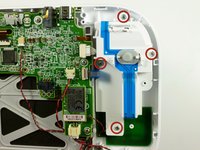
  6. Nintendo Wii U GamePad Analog Stick Replacement: 6 단계, 이미지 2개 중 1개 Nintendo Wii U GamePad Analog Stick Replacement: 6 단계, 이미지 2개 중 2개
    • Remove the top rubber cover by pulling it off of its mounts to access one of the mounting screws.

    • Remove the four 5.2mm Phillips #0 screws.

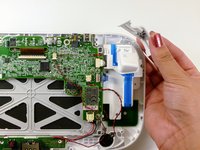
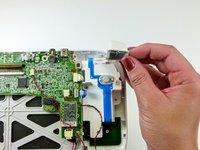
  7. Nintendo Wii U GamePad Analog Stick Replacement: 7 단계, 이미지 2개 중 1개 Nintendo Wii U GamePad Analog Stick Replacement: 7 단계, 이미지 2개 중 2개
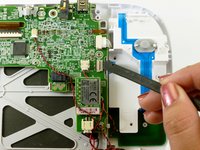
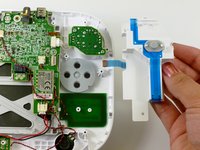
    • Use a spudger to lift the tab which releases the blue ribbon cable.

    • Remove the analog stick and button cover.

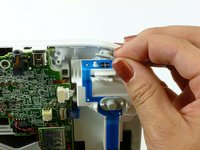
  8. Nintendo Wii U GamePad Analog Stick Replacement: 8 단계, 이미지 1개 중 1개
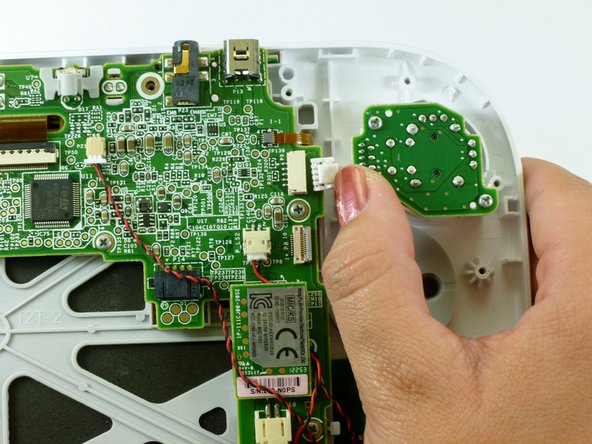
    • Use your thumb and push the connector towards the rightmost edge to disconnect the analog stick cable connector.

  9. Nintendo Wii U GamePad Analog Stick Replacement: 9 단계, 이미지 2개 중 1개 Nintendo Wii U GamePad Analog Stick Replacement: 9 단계, 이미지 2개 중 2개
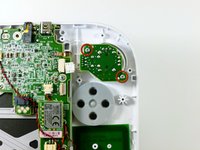
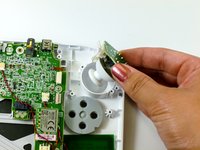
    • Remove the two 9.0mm Tri-point Y0 screws.

    • Lift out the analog stick.

결론

To reassemble your device, follow these instructions in reverse order.

다른 89명이 해당 안내서를 완성하였습니다.

작성자

10다른 기여자 명과 함께

Kim Arre

회원 가입일: 01/11/13

5,460 평판

안내서 8개를 작성함

Cal Poly, Team 17-20, Forte Winter 2013 Cal Poly, Team 17-20, Forte Winter 2013 회원

CPSU-FORTE-W13S17G20

5 회원들

안내서 41개를 작성함

35가이드 댓글

where can i find replacement analogs for wiiu gamepad and wiiu procontoller?

Victor Torres - 답글

www.ebay.com

mhuntersr -

They are available at ebay.com Cost around 7,50 $ Left & Right (different - look what you need). Comes all from china or hong Kong but Quality is 1A (so far i can tell).

Frederik Rischmann -

Bump previous question because dogs seem to enjoy their texture.

maskedpainter - 답글

Has anyone tried this?

http://dx.com/p/replacement-3d-analog-st...

I know it says for the pro controller. But based from the images, the pins could be compatible.

wandererwk - 답글

댓글 쓰기

조회 통계:

지난 24시간: 14

지난 7일: 169

지난 30일: 677

전체 시간: 111,834