주요 콘텐츠로 건너뛰기

Nokia 2610 Battery and Sim Card Replacement

필요한 것

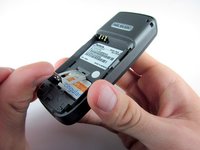
  1. Nokia 2610 Battery and Sim Card Replacement, Battery and Sim Card: 1 단계, 이미지 3개 중 1개 Nokia 2610 Battery and Sim Card Replacement, Battery and Sim Card: 1 단계, 이미지 3개 중 2개 Nokia 2610 Battery and Sim Card Replacement, Battery and Sim Card: 1 단계, 이미지 3개 중 3개
    • Place your thumb on the middle of the back cover and push it toward the bottom of the phone to slide the cover off.

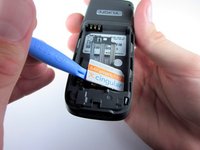
  2. Nokia 2610 Battery and Sim Card Replacement: 2 단계, 이미지 3개 중 1개 Nokia 2610 Battery and Sim Card Replacement: 2 단계, 이미지 3개 중 2개 Nokia 2610 Battery and Sim Card Replacement: 2 단계, 이미지 3개 중 3개
    • Use a plastic opening tool (or your finger) to gently pry the battery out of the battery slot on the back of the phone.

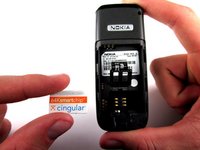
  3. Nokia 2610 Battery and Sim Card Replacement: 3 단계, 이미지 3개 중 1개 Nokia 2610 Battery and Sim Card Replacement: 3 단계, 이미지 3개 중 2개 Nokia 2610 Battery and Sim Card Replacement: 3 단계, 이미지 3개 중 3개
    • Lift the metal sim card holder (at the bottom of the battery slot) up and carefully pry the sim card out of its slot with a plastic opening tool or your finger.

    • After removal, lower the metal sim card holder into its original position.

결론

To reassemble your device, follow these instructions in reverse order.

다른 5명이 해당 안내서를 완성하였습니다.

작성자

5다른 기여자 명과 함께

Taylor Hinsdale

회원 가입일: 10/05/10

93 평판

안내서 2개를 작성함

Cal Poly, Team 7-52, Amido Fall 2010 Cal Poly, Team 7-52, Amido Fall 2010 회원

CPSU-AMIDO-F10S7G52

4 회원들

안내서 12개를 작성함

0가이드 댓글

댓글 쓰기

조회 통계:

지난 24시간: 0

지난 7일: 7

지난 30일: 21

전체 시간: 6,749