주요 콘텐츠로 건너뛰기

PDP Rematch Advanced Joystick Cover Replacement

필요한 것

  1. PDP Rematch Advanced Joystick Cover Replacement, Joystick Cover: 1 단계, 이미지 3개 중 1개 PDP Rematch Advanced Joystick Cover Replacement, Joystick Cover: 1 단계, 이미지 3개 중 2개 PDP Rematch Advanced Joystick Cover Replacement, Joystick Cover: 1 단계, 이미지 3개 중 3개
    • Orient the controller so the back side is facing you.

    • Use a Phillips #000 screwdriver to remove the seven 9 mm screws that secure the back shell.

  2. PDP Rematch Advanced Joystick Cover Replacement: 2 단계, 이미지 3개 중 1개 PDP Rematch Advanced Joystick Cover Replacement: 2 단계, 이미지 3개 중 2개 PDP Rematch Advanced Joystick Cover Replacement: 2 단계, 이미지 3개 중 3개
    • Pull apart the controller's front and back shells with moderate force.

    • Orient the controller so that the front shell is facing the floor to prevent the face buttons from falling out.

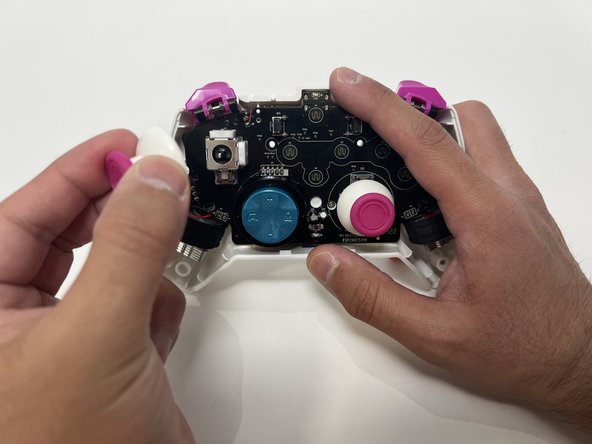
  3. PDP Rematch Advanced Joystick Cover Replacement: 3 단계, 이미지 2개 중 1개 PDP Rematch Advanced Joystick Cover Replacement: 3 단계, 이미지 2개 중 2개
    • Twist the thumbstick to remove it from the motherboard. Repeat this step if both thumbsticks need to be replaced.

결론

To reassemble your device, follow these instructions in reverse order.

다른 2명이 해당 안내서를 완성하였습니다.

작성자

3다른 기여자 명과 함께

Angel Velasquez

회원 가입일: 01/30/24

360 평판

안내서 3개를 작성함

Utah Tech University, Team 1-1, McMurrin Spring 2024 Utah Tech University, Team 1-1, McMurrin Spring 2024 회원

UTAHTECH-MCMURRIN-S24S1G1

2 회원들

안내서 7개를 작성함

0가이드 댓글

댓글 쓰기

조회 통계:

지난 24시간: 2

지난 7일: 18

지난 30일: 78

전체 시간: 1,393