주요 콘텐츠로 건너뛰기

PSP E1000 Battery Replacement

필요한 것

  1. PSP E1000 Battery Replacement, Battery: 1 단계, 이미지 2개 중 1개 PSP E1000 Battery Replacement, Battery: 1 단계, 이미지 2개 중 2개
    • To start the replacement flip the device over

  2. PSP E1000 Battery Replacement: 2 단계, 이미지 2개 중 1개 PSP E1000 Battery Replacement: 2 단계, 이미지 2개 중 2개
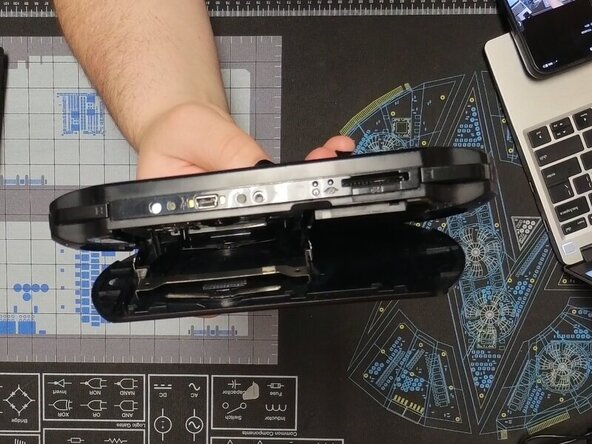
    • We are going to start by removing the back panel.

    • To do this open the panel and gently squeeze in the UMD tray until it pops up.

    • It should lay flat against the back panel while open if done correctly

  3. PSP E1000 Battery Replacement: 3 단계, 이미지 2개 중 1개 PSP E1000 Battery Replacement: 3 단계, 이미지 2개 중 2개
    • Gently bend the back panel to free the hinge on the left.

    • Once it is popped out it should look like the second photo

    • The back panel can then be slid off

  4. PSP E1000 Battery Replacement: 5 단계, 이미지 3개 중 1개 PSP E1000 Battery Replacement: 5 단계, 이미지 3개 중 2개 PSP E1000 Battery Replacement: 5 단계, 이미지 3개 중 3개
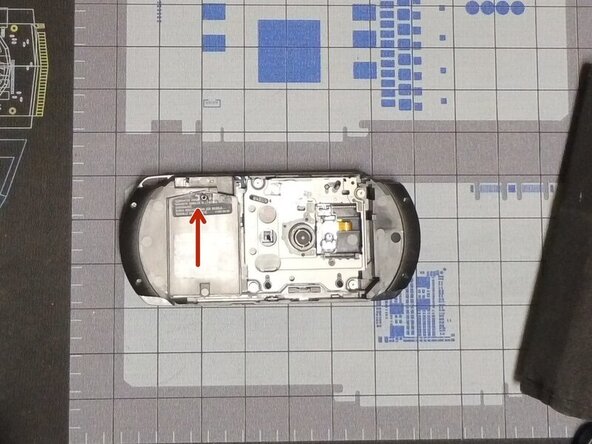
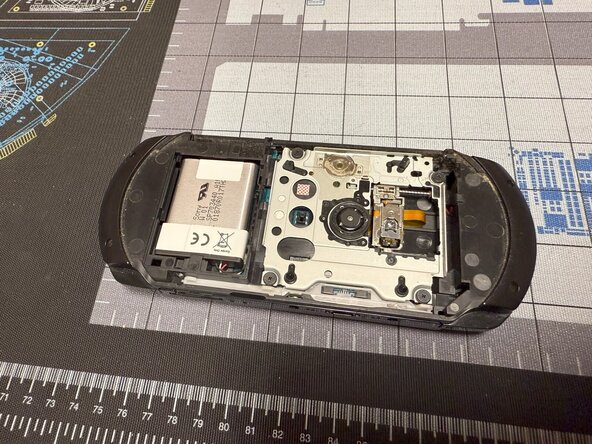
    • Remove the screw with a #00 Philips and slide up the battery cover.

    • The battery can now be removed by pulling it out.

    • When reinstalling, it is useful to use a spudger to push the cable back in.

    • Congratulations you have replaced your PSP E1000's battery

결론

To reassemble your device, follow these instructions in reverse order.

다른 2명이 해당 안내서를 완성하였습니다.

작성자

1다른 기여자 명과 함께

Caleb Pierce

회원 가입일: 04/19/22

1,121 평판

안내서 8개를 작성함

1가이드 댓글

댓글 쓰기

조회 통계:

지난 24시간: 2

지난 7일: 58

지난 30일: 253

전체 시간: 2,329
