주요 콘텐츠로 건너뛰기

Power Mac G4 MDD RAM Replacement

필요한 것

  1. Power Mac G4 MDD RAM Replacement, Case: 1 단계, 이미지 2개 중 1개 Power Mac G4 MDD RAM Replacement, Case: 1 단계, 이미지 2개 중 2개
    • The Power Mac G4 MDD: the last, and the fastest G4-based Mac. This computer boasted up to a Dual 1.42GHz PowerPC G4 CPU (though I have a single 1.25GHz).

    • Two USB 1.1 Ports

    • Assorted Audio

    • Video (ADC & DVI)

    • Networking (RJ-45 Ethernet/56k Modem)

    • Some later model MDD's (such as the dual 1.42GHz) Have a FireWire 800 Port Here:

  2. Power Mac G4 MDD RAM Replacement: 2 단계, 이미지 3개 중 1개 Power Mac G4 MDD RAM Replacement: 2 단계, 이미지 3개 중 2개 Power Mac G4 MDD RAM Replacement: 2 단계, 이미지 3개 중 3개
    • Unplug the computer.

    • Unplug the power supply and all external connections from the computer.

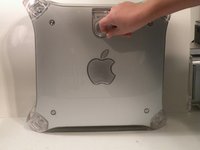
    • Pull on the side lever and lower the side of the case.

  3. Power Mac G4 MDD RAM Replacement, RAM: 3 단계, 이미지 3개 중 1개 Power Mac G4 MDD RAM Replacement, RAM: 3 단계, 이미지 3개 중 2개 Power Mac G4 MDD RAM Replacement, RAM: 3 단계, 이미지 3개 중 3개
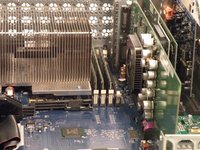
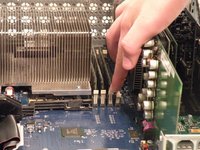
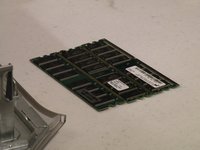
    • The ram is between the graphics card, and the CPU, and removal is simple. Push the tabs down on both sides, this will free the ram, then lift it out.

    • The MDD uses a maximum of 2GB PC2700 DDR RAM (512MB X4) and has 4 slots.

결론

To reassemble your device, follow these instructions in reverse order.

다른 18명이 해당 안내서를 완성하였습니다.

작성자

5다른 기여자 명과 함께

Chris Green

회원 가입일: 10/11/09

38,086 평판

안내서 49개를 작성함

Master Techs Master Techs 회원

Community

329 회원들

안내서 1,451개를 작성함

0가이드 댓글

댓글 쓰기

조회 통계:

지난 24시간: 2

지난 7일: 9

지난 30일: 27

전체 시간: 12,874