소개
Remplacement du SSD m.2 interne d'un Dell Latitude E7470. Il vous sera nécessaire de choisir un SSD m.2 2280 uniquement, les autres tailles ne sont pas compatibles avec ce PC.
필요한 것
-
-
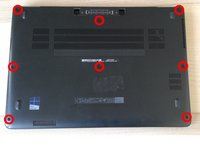
Pour commencer, avec le tournevis Philips #0 retirez les 8 vis entourées en rouge sur la photo ci-contre.
-
Puis à l'aide du iFixit Opening Picks, soulevez depuis le connecteur docks. Déclipsez-le doucement.
-
-
-
-
Après avoir retiré le capot, l'emplacement du SSD est en bas à droite, juste à côté de la batterie.
-
Pour retirer le SSD, il suffit de retirer l'unique vis qui le retient. Vous pouvez alors tirer le SSD hors de son emplacement.
-




Pour réassembler votre appareil, suivez les instructions dans l'ordre inverse.
다른 6명이 해당 안내서를 완성하였습니다.


8가이드 댓글
It does! It has only one plastic piece (I forgot what the proper term is), not 2.
It’s not working for me with Kingston nvme NV1
If no ram or ssd do ya got to put windows 10 back on I got no recover usb .or a dell recovery usb with 10 or what was original on it .its a e7470
Mike Heiss - 답글
Without RAM you cannot start the computer, it is an essential component.
Without SSD you have no storage so you can't install Windows.
Hyperion -
