주요 콘텐츠로 건너뛰기

Ridgid GEN5X R8642 Switch Replacement

필요한 것

  1. Ridgid GEN5X R8642 Switch Replacement, Switch: 1 단계, 이미지 1개 중 1개
    • Remove the plastic tab holding the handle cover in place by prying upward with the spudger until the tab pops off.

  2. Ridgid GEN5X R8642 Switch Replacement: 2 단계, 이미지 1개 중 1개
    • Remove the handle cover by pulling it towards the front of the saw.

    • The grip can sometimes become stuck and may require a decent amount of force to remove.

  3. Ridgid GEN5X R8642 Switch Replacement: 3 단계, 이미지 2개 중 1개 Ridgid GEN5X R8642 Switch Replacement: 3 단계, 이미지 2개 중 2개
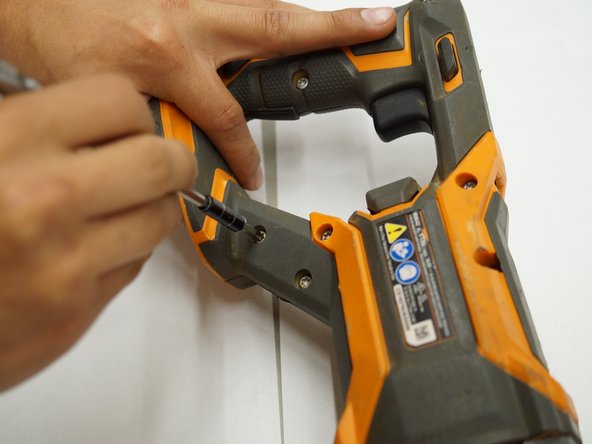
    • Use a T20 Torx screwdriver to remove the nine M4 X 16mm screws from the plastic housing.

  4. Ridgid GEN5X R8642 Switch Replacement: 4 단계, 이미지 1개 중 1개
    • Use a JIS #1 screwdriver to remove the two M4 x 25mm screws on both sides of the metal housing.

  5. Ridgid GEN5X R8642 Switch Replacement: 5 단계, 이미지 1개 중 1개
    • Remove one half of the plastic housing using a spudger so that the internal system is exposed.

  6. Ridgid GEN5X R8642 Switch Replacement: 6 단계, 이미지 1개 중 1개
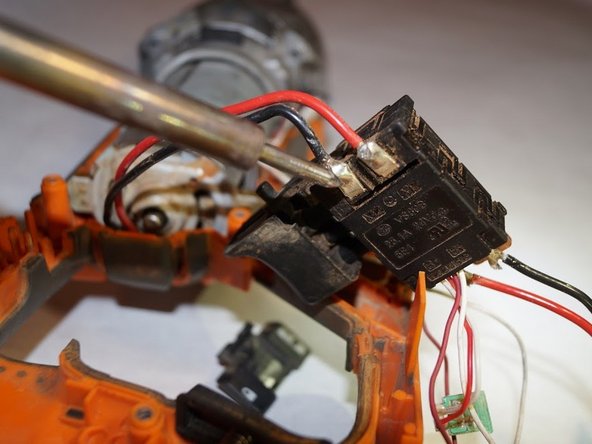
    • Remove the plastic wire covers to the red and black connections on the switch assembly.

  7. Ridgid GEN5X R8642 Switch Replacement: 7 단계, 이미지 1개 중 1개
    • Remove the soldered connection from the switch assembly.

  8. Ridgid GEN5X R8642 Switch Replacement: 8 단계, 이미지 1개 중 1개
결론

To reassemble your device, follow these instructions in reverse order.

작성자

3다른 기여자 명과 함께

Dylan Sutton

회원 가입일: 03/26/19

303 평판

안내서 1개를 작성함

0가이드 댓글

댓글 쓰기

조회 통계:

지난 24시간: 0

지난 7일: 1

지난 30일: 8

전체 시간: 440