주요 콘텐츠로 건너뛰기

Ryobi P202 Bit Storage Clip Replacement

필요한 것

  1. Ryobi P202 Bit Storage Clip Replacement, Battery: 1 단계, 이미지 3개 중 1개 Ryobi P202 Bit Storage Clip Replacement, Battery: 1 단계, 이미지 3개 중 2개 Ryobi P202 Bit Storage Clip Replacement, Battery: 1 단계, 이미지 3개 중 3개
    • The battery can shock you. Only touch plastic, non-conductive components.

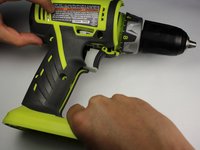
    • Detach the battery unit from the drill body by pressing the battery release buttons on both sides of the unit and pulling outwards.

  2. Ryobi P202 Bit Storage Clip Replacement, Right Side Case: 2 단계, 이미지 2개 중 1개 Ryobi P202 Bit Storage Clip Replacement, Right Side Case: 2 단계, 이미지 2개 중 2개
    • Use a Torx T10 screw driver to unscrew all ten 13.5 mm screws from the drill casing to gain access to the interior.

  3. Ryobi P202 Bit Storage Clip Replacement: 3 단계, 이미지 2개 중 1개 Ryobi P202 Bit Storage Clip Replacement: 3 단계, 이미지 2개 중 2개
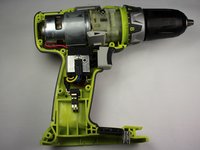
    • Gently lift the casing from the drill body.

    • Take the casing completely off the drill body to gain access to the interior of the drill.

    • The Ryobi P202 casing has Part #: 200690001

  4. Ryobi P202 Bit Storage Clip Replacement, Bit Storage Clip: 4 단계, 이미지 2개 중 1개 Ryobi P202 Bit Storage Clip Replacement, Bit Storage Clip: 4 단계, 이미지 2개 중 2개
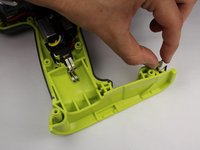
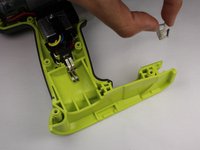
    • Grip the bit-clip and gently lift up to remove it from the case.

    • The bit-clip is Part #: 630206007

결론

To reassemble your device, follow these instructions in reverse order.

작성자

2다른 기여자 명과 함께

Joseph Eckstein

회원 가입일: 04/07/15

1,596 평판

안내서 9개를 작성함

Cal Poly, Team 17-6, Forte Spring 2015 Cal Poly, Team 17-6, Forte Spring 2015 회원

CPSU-FORTE-S15S17G6

4 회원들

안내서 10개를 작성함

0가이드 댓글

댓글 쓰기

조회 통계:

지난 24시간: 0

지난 7일: 1

지난 30일: 4

전체 시간: 525