주요 콘텐츠로 건너뛰기

Samsung Galaxy Camera Lens and Motherboard Replacement

필요한 것

  1. Samsung Galaxy Camera Lens and Motherboard Replacement, Screen: 1 단계, 이미지 1개 중 1개
    • Begin removing the 3/16" screws for the device.

  2. Samsung Galaxy Camera Lens and Motherboard Replacement: 2 단계, 이미지 1개 중 1개
    • Turn the device and remove the additional 3/16" screws.

  3. Samsung Galaxy Camera Lens and Motherboard Replacement: 3 단계, 이미지 1개 중 1개
    • Turn the device and remove the additional 3/16" screw.

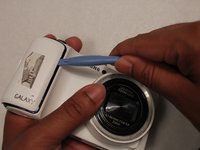
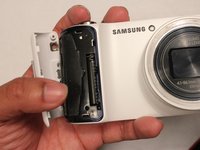
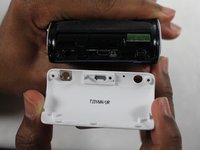
  4. Samsung Galaxy Camera Lens and Motherboard Replacement: 4 단계, 이미지 3개 중 1개 Samsung Galaxy Camera Lens and Motherboard Replacement: 4 단계, 이미지 3개 중 2개 Samsung Galaxy Camera Lens and Motherboard Replacement: 4 단계, 이미지 3개 중 3개
    • Take the white cover plate off.

  5. Samsung Galaxy Camera Lens and Motherboard Replacement: 5 단계, 이미지 1개 중 1개
    • Using the plastic opening tools, pry open the camera from the bottom.

    • This may require a moderate use of force because of the sealing glue.

  6. Samsung Galaxy Camera Lens and Motherboard Replacement: 6 단계, 이미지 1개 중 1개
    • Gently pull the connector away from the motherboard.

  7. Samsung Galaxy Camera Lens and Motherboard Replacement, Lens and Motherboard: 7 단계, 이미지 1개 중 1개
    • Unscrew the motherboard's screws. There are 4 3/32" screws and 3 5/32" screws.

  8. Samsung Galaxy Camera Lens and Motherboard Replacement: 8 단계, 이미지 1개 중 1개
    • Unscrew the lens' screws. There are 1 black 4/32" screw, 3 3/16" black screws, and 2 white 5/32" screws.

  9. Samsung Galaxy Camera Lens and Motherboard Replacement: 9 단계, 이미지 1개 중 1개
    • Pull these connectors away from motherboard.

  10. Samsung Galaxy Camera Lens and Motherboard Replacement: 10 단계, 이미지 1개 중 1개
    • Lift the motherboard and lens out of the case.

결론

To reassemble your device, follow these instructions in reverse order.

다른 10명이 해당 안내서를 완성하였습니다.

작성자

5다른 기여자 명과 함께

Richard Hicks

회원 가입일: 01/13/15

1,280 평판

안내서 4개를 작성함

USF Tampa, Team 1-3, Sullivan Winter 2015 USF Tampa, Team 1-3, Sullivan Winter 2015 회원

USFT-SULLIVAN-W15S1G3

3 회원들

안내서 4개를 작성함

1가이드 댓글

Hey mate, what do you do after the motherboard replacement? Just turn the camera on? Do you need to do a master reset?

Sam - 답글

댓글 쓰기

조회 통계:

지난 24시간: 3

지난 7일: 8

지난 30일: 21

전체 시간: 5,399