주요 콘텐츠로 건너뛰기
수리 커뮤니티 가입 - 계정 만들기

Samsung Galaxy S II T989 Inner Plate Replacement

조회수: 2천

통계 보기:

지난 24시간
1
지난 7일:
14
지난 30일:
96
전체 시간:
2,009
댓글: 0

해당 안내서에 댓글을 남긴 사람이 없습니다. 첫 번째가 되시겠습니까?

Go to guide comments
완료함: 0

이 가이드를 "완료"로 표시한 사람은 아직 없습니다. 첫 번째 주인공이 되시겠어요?

즐겨찾기: 5

5명이 이 가이드를 즐겨찾기 (및 구독) 했습니다. 다음은 귀하의 차례입니까?

소요 시간: 5 분
난이도: 쉬움
Samsung Galaxy S II T989 Inner Plate Replacement

Before being able to access the inside of the phone to repair or replace things like the motherboard, camera, or volume control the inner plate must be removed. This plate protects the delicate wires and circuitry of the device from physical harm.

필요한 것

도구

    1. Samsung Galaxy S II T989 Inner Plate Replacement, Rear Cover: 1 단계, 이미지 3개 중 1개 Samsung Galaxy S II T989 Inner Plate Replacement, Rear Cover: 1 단계, 이미지 3개 중 2개 Samsung Galaxy S II T989 Inner Plate Replacement, Rear Cover: 1 단계, 이미지 3개 중 3개
      • To remove the rear cover, locate the tab indicated by the red outline.

      • Using your fingernail, gently pry the rear cover.

      댓글 쓰기

    1. Samsung Galaxy S II T989 Inner Plate Replacement, SIM Card: 2 단계, 이미지 3개 중 1개 Samsung Galaxy S II T989 Inner Plate Replacement, SIM Card: 2 단계, 이미지 3개 중 2개 Samsung Galaxy S II T989 Inner Plate Replacement, SIM Card: 2 단계, 이미지 3개 중 3개
      • The SIM card is the small white rectangle located in the red rectangle.

      • To remove the SIM card, press down on the card and slide it to the left, until it no longer is in contact with the metal.

      댓글 쓰기

    1. Samsung Galaxy S II T989 Inner Plate Replacement, Media Card: 3 단계, 이미지 3개 중 1개 Samsung Galaxy S II T989 Inner Plate Replacement, Media Card: 3 단계, 이미지 3개 중 2개 Samsung Galaxy S II T989 Inner Plate Replacement, Media Card: 3 단계, 이미지 3개 중 3개
      • The media card is found inside the area indicated with the red rectangle. The card itself is small and black making it hard to easily see.

      • After locating the card, gently use your fingers to slide the card to the right, until the card is no longer in contact with the metal.

      댓글 쓰기

    1. Samsung Galaxy S II T989 Inner Plate Replacement, Battery: 4 단계, 이미지 3개 중 1개 Samsung Galaxy S II T989 Inner Plate Replacement, Battery: 4 단계, 이미지 3개 중 2개 Samsung Galaxy S II T989 Inner Plate Replacement, Battery: 4 단계, 이미지 3개 중 3개
      • Turn off the phone before removing battery.

      • The battery can be removed from the phone by applying an upwards pressure to the bottom right edge of the battery, as indicated by the red rectangle.

      • After the battery starts to lift upwards, use your hand to hold and remove it.

      댓글 쓰기

    1. Samsung Galaxy S II T989 Inner Plate Replacement, Inner Plate: 5 단계, 이미지 3개 중 1개 Samsung Galaxy S II T989 Inner Plate Replacement, Inner Plate: 5 단계, 이미지 3개 중 2개 Samsung Galaxy S II T989 Inner Plate Replacement, Inner Plate: 5 단계, 이미지 3개 중 3개
      이 단계에 사용된 도구:
      Magnetic Project Mat
      $19.95
      • The inner plate is held on by six screws that are 1/16 of an inch (1.6 mm).

      • Remove the screws with a Philips head precision screwdriver.

      • Place all screws someplace that they will not easily be lost, such as a magnetic mat or a plastic bag.

      댓글 쓰기

    2. Samsung Galaxy S II T989 Inner Plate Replacement: 6 단계, 이미지 3개 중 1개 Samsung Galaxy S II T989 Inner Plate Replacement: 6 단계, 이미지 3개 중 2개 Samsung Galaxy S II T989 Inner Plate Replacement: 6 단계, 이미지 3개 중 3개
      • When removing the inner plate, place device on grounded surface or use anti static wrist band.

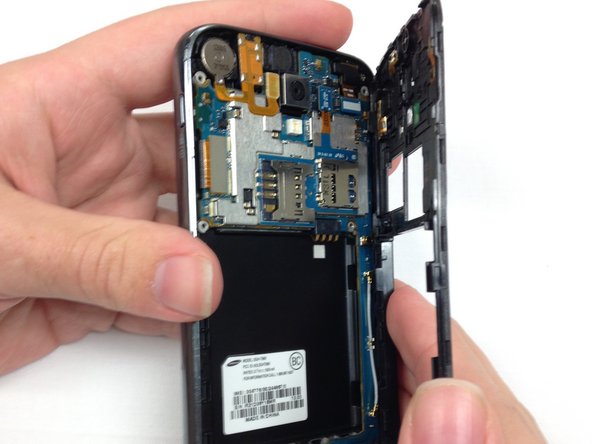
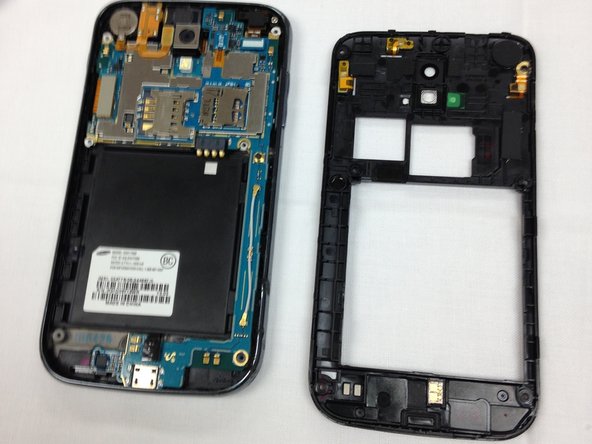
      • After the screws have been removed, the only thing holding the inner plate in is several plastic tabs built into the frame of the phone.

      • Firmly pinch the edge, as shown in the picture, and pull the plate away from the frame.

      • If you cannot get a grip on the inner plate, consider using the spudger to pry and lift the plate out.

      댓글 쓰기

결론

To reassemble your device, follow these instructions in reverse order.

취소: 해당 안내서를 완성하지 않았습니다.

작성자

6다른 기여자 명과 함께

Joshua King

회원 가입일: 03/26/14

1,378 평판

안내서 9개를 작성함

팀

Clemson, Team 1-5, Benson Spring 2014 Clemson, Team 1-5, Benson Spring 2014 회원

CLEM-BENSON-S14S1G5

4 회원들

안내서 108개를 작성함

0가이드 댓글

댓글 쓰기

조회 통계:

지난 24시간: 1

지난 7일: 14

지난 30일: 96

전체 시간: 2,009