주요 콘텐츠로 건너뛰기
수리 커뮤니티 가입 - 계정 만들기

Samsung Galaxy Tab 2 10.1 Headphone Jack Replacement

조회수: 4.4천

통계 보기:

지난 24시간
4
지난 7일:
21
지난 30일:
103
전체 시간:
4,358
댓글: 3

3 comments on steps.

완료함: 6

6명이 이 안내서를 "완료"로 표시했습니다. 다음은 귀하의 차례입니까?

즐겨찾기: 0

해당 안내서에 좋아요를 누르고 구독한 사람이 아직 없습니다. 첫 번째 주인공이 되시겠습니까?

소요 시간: 10 - 15 분
난이도: 쉬움
잘못된 도구

이미지 및/또는 텍스트의 올바른 도구를 사용하여 해당 안내서를 더 효과적으로 만들어 주십시오.

Samsung Galaxy Tab 2 10.1 Headphone Jack Replacement

If the audio does not play, even after you restart the device, then you may need to replace the headphone jack.

In this guide, you will learn how to replace the headphone jack.

Caution: Some images display the steps using a metal spudger. Use the heavy-duty spudger instead to avoid damaging your circuits.

For more information on connectors, visit this page.

필요한 것

도구

    1. Samsung Galaxy Tab 2 10.1 Headphone Jack Replacement, Back Cover: 1 단계, 이미지 2개 중 1개 Samsung Galaxy Tab 2 10.1 Headphone Jack Replacement, Back Cover: 1 단계, 이미지 2개 중 2개
      이 단계에 사용된 도구:
      Heavy-Duty Spudger
      $4.99
      • The plastic opening tool may break during this step. You may need to use the heavy duty spudger instead.

      • Insert the plastic opening tool between the glass screen and the back cover so the curved end of the plastic opening tool is under the glass. Gently pry the back cover away from the glass screen.

      • Be sure to lift the entire display from the body and that you are not are lifting the glass from the display. You will need to reach down a little further for the correct removal.

      • Continue inserting the plastic opening tool around the whole device screen to completely separate the back cover from the glass screen.

      댓글 쓰기

    2. Samsung Galaxy Tab 2 10.1 Headphone Jack Replacement: 2 단계, 이미지 2개 중 1개 Samsung Galaxy Tab 2 10.1 Headphone Jack Replacement: 2 단계, 이미지 2개 중 2개
      • Gently lift the screen up with your finger.

      • If the screen will not separate from the back cover, try repeating step 1.

      댓글 쓰기

    1. Samsung Galaxy Tab 2 10.1 Headphone Jack Replacement, Battery Disconnect: 3 단계, 이미지 1개 중 1개
      • Using your fingers, remove the green tape covering the battery connector.

      댓글 쓰기

    2. Samsung Galaxy Tab 2 10.1 Headphone Jack Replacement: 4 단계, 이미지 3개 중 1개 Samsung Galaxy Tab 2 10.1 Headphone Jack Replacement: 4 단계, 이미지 3개 중 2개 Samsung Galaxy Tab 2 10.1 Headphone Jack Replacement: 4 단계, 이미지 3개 중 3개
      이 단계에 사용된 도구:
      Heavy-Duty Spudger
      $4.99
      • Insert the flat end of the heavy-duty spudger between the wires and underneath the battery connector. Carefully lift the black battery connector up to disconnect it from the motherboard.

      • The metal spudger shown in the photo is not recommended due to the possibility of an electrical short. Use an ESD-safe tool, such as a heavy-duty (nylon) spudger.

      댓글 쓰기

    1. Samsung Galaxy Tab 2 10.1 Headphone Jack Replacement, Headphone Jack: 5 단계, 이미지 2개 중 1개 Samsung Galaxy Tab 2 10.1 Headphone Jack Replacement, Headphone Jack: 5 단계, 이미지 2개 중 2개
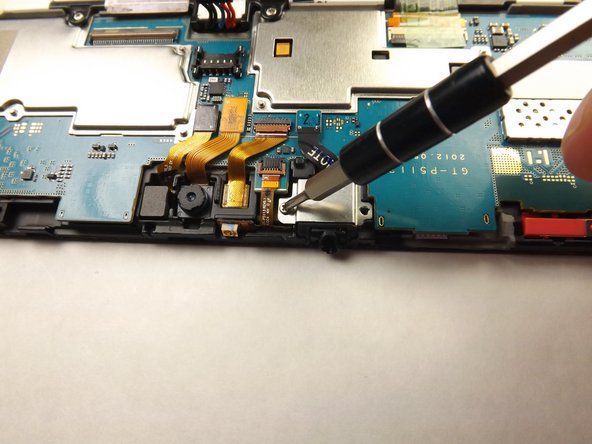
      • Unscrew the two 3mm screws with the Phillips 000 screwdriver.

      댓글 쓰기

    2. Samsung Galaxy Tab 2 10.1 Headphone Jack Replacement: 6 단계, 이미지 1개 중 1개
      • Lift the black cable connector with the plastic opening tool to disconnect the cable from the device.

      댓글 쓰기

    3. Samsung Galaxy Tab 2 10.1 Headphone Jack Replacement: 7 단계, 이미지 1개 중 1개
      이 단계에 사용된 도구:
      Heavy-Duty Spudger
      $4.99
      • Slide the flat end of heavy-duty spudger under the audio jack cover and lift up to remove the metal cover from the device.

      댓글 쓰기

    4. Samsung Galaxy Tab 2 10.1 Headphone Jack Replacement: 8 단계, 이미지 1개 중 1개
      • Insert the flat end of the heavy-duty spudger under the headphone jack and gently lift up to remove the headphone jack from the device.

      댓글 쓰기

결론

To reassemble your device, follow these instructions in reverse order.

취소: 해당 안내서를 완성하지 않았습니다.

다른 6명이 해당 안내서를 완성하였습니다.

작성자

3다른 기여자 명과 함께

Amy Tsai

회원 가입일: 01/30/15

2,017 평판

안내서 2개를 작성함

팀

Cal Poly, Team 6-26, Amido Winter 2015 Cal Poly, Team 6-26, Amido Winter 2015 회원

CPSU-AMIDO-W15S6G26

5 회원들

안내서 72개를 작성함

0가이드 댓글

댓글 쓰기

조회 통계:

지난 24시간: 4

지난 7일: 21

지난 30일: 103

전체 시간: 4,358