주요 콘텐츠로 건너뛰기

Samsung Instinct Camera Replacement

필요한 것

  1. Samsung Instinct Camera Replacement, Battery: 1 단계, 이미지 1개 중 1개
    • Apply pressure to the back cover and slide it forward towards the camera.

    • Lift the back cover off the phone.

  2. Samsung Instinct Camera Replacement: 2 단계, 이미지 1개 중 1개
    • Holding the phone firmly, use the notches to grip and lift up the battery.

  3. Samsung Instinct Camera Replacement, Back Case: 3 단계, 이미지 1개 중 1개
    • Remove the four 4.45mm screws at the corners of the phone.

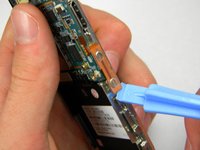
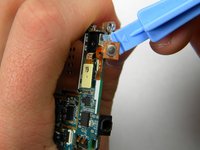
  4. Samsung Instinct Camera Replacement: 4 단계, 이미지 2개 중 1개 Samsung Instinct Camera Replacement: 4 단계, 이미지 2개 중 2개
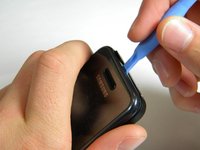
    • Use the plastic opening tool to unhinge the locks around the edges of the phone.

    • Do not worry about the inner components of the phone; they are not connected to this case.

  5. Samsung Instinct Camera Replacement: 5 단계, 이미지 1개 중 1개
    • Lift the casing off of the phone.

  6. Samsung Instinct Camera Replacement, Antenna: 6 단계, 이미지 1개 중 1개
    • With the screws removed, locate the antenna.

  7. Samsung Instinct Camera Replacement: 7 단계, 이미지 1개 중 1개
    • Using a Phillips head screwdriver, remove the 4.50mm screw holding the antenna in place.

  8. Samsung Instinct Camera Replacement: 8 단계, 이미지 1개 중 1개
    • Using the plastic opener tool, squeeze gently on the antenna cable connector and lift to remove the connector from its position.

  9. Samsung Instinct Camera Replacement: 9 단계, 이미지 1개 중 1개
    • Gently lift up on the antenna and remove it from the back of the device.

  10. Samsung Instinct Camera Replacement, Front Case: 10 단계, 이미지 1개 중 1개
    • Remove the two 3.50mm screws connecting the motherboard to the case.

  11. Samsung Instinct Camera Replacement: 11 단계, 이미지 3개 중 1개 Samsung Instinct Camera Replacement: 11 단계, 이미지 3개 중 2개 Samsung Instinct Camera Replacement: 11 단계, 이미지 3개 중 3개
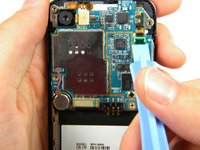
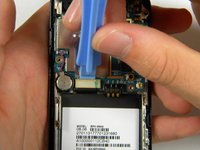
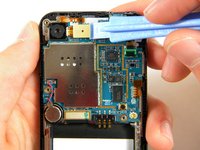
    • Use the plastic opener tool to detach the three ribbons on the motherboard.

  12. Samsung Instinct Camera Replacement: 12 단계, 이미지 1개 중 1개
    • Lift out the top right ribbon from its slot on the motherboard.

  13. Samsung Instinct Camera Replacement: 13 단계, 이미지 2개 중 1개 Samsung Instinct Camera Replacement: 13 단계, 이미지 2개 중 2개
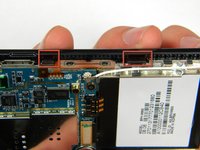
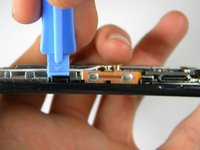
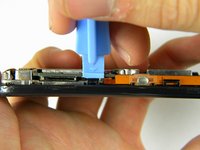
    • Use the plastic opener tool to unhinge the the locks on the side of the motherboard connecting it to the front casing.

  14. Samsung Instinct Camera Replacement: 14 단계, 이미지 1개 중 1개
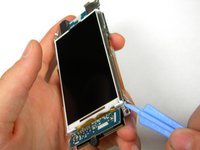
    • Lift the motherboard away from the front casing.

  15. Samsung Instinct Camera Replacement: 15 단계, 이미지 1개 중 1개
    • After removing lifting up on the motherboard, the front casing and center frame should be separated as shown.

  16. Samsung Instinct Camera Replacement, Motherboard: 16 단계, 이미지 3개 중 1개 Samsung Instinct Camera Replacement, Motherboard: 16 단계, 이미지 3개 중 2개 Samsung Instinct Camera Replacement, Motherboard: 16 단계, 이미지 3개 중 3개
    • Using the plastic opener tool, gently pry away the side strip control buttons from the metal center frame.

    • There are three strips total: one on the right, left, and top of the phone.

  17. Samsung Instinct Camera Replacement: 17 단계, 이미지 1개 중 1개
    • Using the plastic opener tool, pry the speaker connector away from the back of the motherboard.

  18. Samsung Instinct Camera Replacement: 18 단계, 이미지 1개 중 1개
    • Using the plastic opener tool, remove the speaker from its setting.

    • Pry where the wire enters the speaker.

    • The speaker has adhesive on the bottom, thus removing it will require a bit of wiggling.

  19. Samsung Instinct Camera Replacement: 19 단계, 이미지 1개 중 1개
    • Gently lift the motherboard from the center frame.

  20. Samsung Instinct Camera Replacement, Camera: 20 단계, 이미지 1개 중 1개
    • Once the motherboard is removed from the frame, use the pry tool to remove the camera.

    • Insert the pry bar between the camera and the frame then lift up.

    • The camera is held in by adhesive so it will require some force to remove.

    • You have now successfully removed the camera from your Samsung Instinct.

결론

To reassemble your device, follow these instructions in reverse order.

다른 2명이 해당 안내서를 완성하였습니다.

작성자

5다른 기여자 명과 함께

Patrick

회원 가입일: 10/11/11

75 평판

안내서 2개를 작성함

Cal Poly, Team 3-13, Regan Fall 2011 Cal Poly, Team 3-13, Regan Fall 2011 회원

CPSU-REGAN-F11S3G13

4 회원들

안내서 16개를 작성함

0가이드 댓글

댓글 쓰기

조회 통계:

지난 24시간: 0

지난 7일: 0

지난 30일: 8

전체 시간: 941