주요 콘텐츠로 건너뛰기

Samsung SCV-VLUUST50 Screen Replacement

필요한 것

  1. Samsung SCV-VLUUST50 Screen Replacement, Cover: 1 단계, 이미지 3개 중 1개 Samsung SCV-VLUUST50 Screen Replacement, Cover: 1 단계, 이미지 3개 중 2개 Samsung SCV-VLUUST50 Screen Replacement, Cover: 1 단계, 이미지 3개 중 3개
    • Unscrew all visible screws indicated by red circles with a #00 Phillips driver.

    • Slide memory card cover and unscrew hidden screw underneath with a #00 Phillips driver.

  2. Samsung SCV-VLUUST50 Screen Replacement: 2 단계, 이미지 3개 중 1개 Samsung SCV-VLUUST50 Screen Replacement: 2 단계, 이미지 3개 중 2개 Samsung SCV-VLUUST50 Screen Replacement: 2 단계, 이미지 3개 중 3개
    • Remove the flat side panel by applying gentle pressure toward the bottom of the camera.

    • Remove the corner panel by applying pressure away from the shutter button.

    • The memory card cover will come off with the corner panel.

    • Remove the top panel by applying gentle pressure away from the shutter button.

  3. Samsung SCV-VLUUST50 Screen Replacement: 3 단계, 이미지 1개 중 1개
    • Remove screws beneath the top panel indicated by red circles with a #00 Phillips driver.

  4. Samsung SCV-VLUUST50 Screen Replacement: 4 단계, 이미지 2개 중 1개 Samsung SCV-VLUUST50 Screen Replacement: 4 단계, 이미지 2개 중 2개
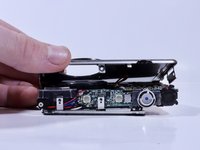
    • Remove the front and back covers by pulling them straight apart.

  5. Samsung SCV-VLUUST50 Screen Replacement, Screen: 5 단계, 이미지 3개 중 1개 Samsung SCV-VLUUST50 Screen Replacement, Screen: 5 단계, 이미지 3개 중 2개 Samsung SCV-VLUUST50 Screen Replacement, Screen: 5 단계, 이미지 3개 중 3개
    • Open the ribbon connector with your fingernail.

    • Pull the ribbon out of the connection.

  6. Samsung SCV-VLUUST50 Screen Replacement: 6 단계, 이미지 1개 중 1개
    • Pull the ribbon connected to the screen out from behind the button circuitry on the rear of the camera.

    • Feed the new screen's ribbon through the same slot it came out of.

결론

To reassemble your device, follow these instructions in reverse order.

작성자

1다른 기여자 명과 함께

Evert Jordan

회원 가입일: 02/08/18

287 평판

안내서 2개를 작성함

0가이드 댓글

댓글 쓰기

조회 통계:

지난 24시간: 0

지난 7일: 2

지난 30일: 9

전체 시간: 250