주요 콘텐츠로 건너뛰기

Samsung ST76 Screen Replacement

필요한 것

  1. Samsung ST76 Screen Replacement, Back Panel: 1 단계, 이미지 3개 중 1개 Samsung ST76 Screen Replacement, Back Panel: 1 단계, 이미지 3개 중 2개 Samsung ST76 Screen Replacement, Back Panel: 1 단계, 이미지 3개 중 3개
    • Use a Phillips head screwdriver to remove 5 screws from the camera. There are 2 4mm screws on the left side, 2 2mm screws on the right side and 1 4mm screw on the bottom.

    • Do not mix the 5 screws; they are different sizes.

  2. Samsung ST76 Screen Replacement: 2 단계, 이미지 2개 중 1개 Samsung ST76 Screen Replacement: 2 단계, 이미지 2개 중 2개
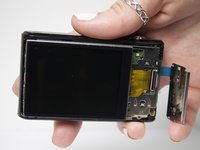
    • Use your fingers to pull the back cover off.

  3. Samsung ST76 Screen Replacement, Screen: 3 단계, 이미지 2개 중 1개 Samsung ST76 Screen Replacement, Screen: 3 단계, 이미지 2개 중 2개
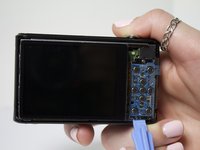
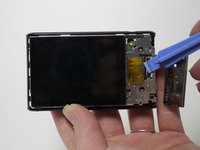
    • Separate the button panel to reveal the port holding the screen on.

    • Use a plastic opening tool to help with this task.

  4. Samsung ST76 Screen Replacement: 4 단계, 이미지 2개 중 1개 Samsung ST76 Screen Replacement: 4 단계, 이미지 2개 중 2개
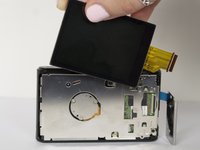
    • Remove the yellow cable by pulling gently upwards, away from the inside of the camera, until it separates from its port.

결론

To reassemble your device, follow these instructions in reverse order.

다른 3명이 해당 안내서를 완성하였습니다.

작성자

3다른 기여자 명과 함께

Angela Fierst

회원 가입일: 03/11/15

373 평판

안내서 2개를 작성함

Marist, Team 1-6, Laflen Spring 2015 Marist, Team 1-6, Laflen Spring 2015 회원

MARS-LAFLEN-S15S1G6

2 회원들

안내서 8개를 작성함

1가이드 댓글

Where did you buy a replacement screen?

Demaree Wiitala - 답글

댓글 쓰기

조회 통계:

지난 24시간: 1

지난 7일: 4

지난 30일: 13

전체 시간: 846